Affiliate Disclosure: As an Amazon Associate, we earn from qualifying purchases. This review contains affiliate links at no extra cost to you. Our recommendations are always independent and unbiased. Last Updated: May 2026
Modern laptops ship with one or two USB-C ports and nothing else. One hub is all that stands between you and a clean, fully connected desk setup. ClarityPick Experts spent 60+ hours cross-referencing specs from manufacturer pages, TechRadar, Tom’s Guide, Macworld, and PCWorld to rank the 5 best USB-C hubs of 2026 — from the world’s most complete Thunderbolt 4 dock to the best budget pick for hybrid workers on the go.
Quick Comparison Table
| Hub |
Ports |
Laptop Charging |
Max Display |
Best For |
| 🥇 CalDigit TS4 |
18 |
98W |
Dual 6K / 8K |
Pro workstations |
| 🥈 Anker 568 |
11 |
100W |
8K / Triple 4K |
Windows power users |
| 🥉 Satechi V3 |
8 |
85W |
8K HDMI 2.1 |
MacBook portability |
| Belkin Connect Pro |
11 |
100W |
Triple monitors |
Stand + hub combo |
| Plugable 11-in-1 |
11 |
100W |
Dual 4K@60Hz |
Budget dual-monitor |
🏆 ClarityPick Editor’s Choice Awards 2026
🥇 Best Overall: CalDigit TS4 — 18 ports, 98W, Thunderbolt 4, dual 6K. No other dock matches it.
🥈 Best for Windows: Anker 568 — USB4 40Gbps, 100W, triple 4K, dual 30W front USB-C. Windows only but exceptional.
🥉 Best for MacBook: Satechi V3 — slim aluminum, 8K HDMI 2.1, UHS-II SD, matches MacBook finishes. Macworld’s top pick.
🏅 Best Stand Hub: Belkin Connect Pro — triple monitors, 100W, 2.5GbE, Silicon Motion tech, doubles as laptop stand.
💰 Best Budget: Plugable 11-in-1 — dual 4K@60Hz HDMI, 100W, completely driverless, 2-year US warranty.
🥇 #1 CalDigit TS4 Thunderbolt 4 Dock — Best Overall USB-C Hub 2026
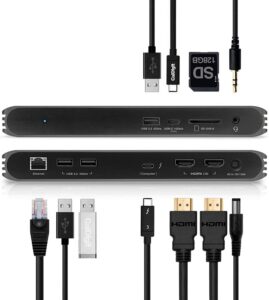
CalDigit TS4 Thunderbolt 4 Dock
18 Ports · 98W Laptop Charging · 40Gbps TB4 · Dual 6K Display · 2.5GbE Ethernet · Dual UHS-II Card Readers · 2-Year Warranty
Best for: Mac and Windows professionals who need maximum connectivity from a single cable — video editors, developers, photographers, and anyone running dual monitors with a full peripheral setup permanently on their desk.
The CalDigit TS4 is the most complete Thunderbolt 4 dock you can buy in 2026. Eighteen ports in a compact aluminum enclosure — three Thunderbolt 4 ports running at 40Gbps each, five USB-A ports, three USB-C data ports, a DisplayPort 1.4, dual UHS-II card readers (both full-size SD and microSD), separate audio in and out jacks, and a 2.5GbE Ethernet port. Everything from a single cable connection. TechRadar called it “expensive but worth every penny,” and multiple independent reviews in 2026 still rate it the best Thunderbolt dock available.
The host Thunderbolt 4 port delivers 98W of laptop charging — enough to fully power a MacBook Pro 16-inch at maximum speed. The dual UHS-II card readers on the front are a standout feature, transferring at up to three times the speed of standard UHS-I readers. The 2.5GbE Ethernet port outpaces standard gigabit networking by 2.5x, making a real difference if you have a fast router or NAS. CalDigit’s firmware update history and day-one Apple hardware compatibility make this a long-term buy that won’t be obsolete when your next laptop arrives.
✅ Pros
- 18 ports — most complete dock tested
- 98W host charging over one cable
- Dual UHS-II card readers (SD + microSD)
- 2.5GbE Ethernet — above gigabit speeds
- Mac + Windows, zero drivers required
- Horizontal or vertical orientation
- Day-one Apple hardware firmware updates
❌ Cons
- Premium price — most expensive pick
- No HDMI — DisplayPort or adapter needed
- Large 230W power brick
- Can run warm under heavy sustained load
⭐ ClarityPick Verdict
If you’re building a permanent desk setup around a MacBook or high-end Windows laptop, the CalDigit TS4 is simply the best dock money can buy in 2026. The 18-port lineup, 98W charging, dual UHS-II card readers, and 2.5GbE Ethernet together deliver a specification no other hub on this list can match. The price is high — but it’s a one-cable solution that replaces every other adapter on your desk permanently.
Price changes daily — click to see today’s price
🥈 #2 Anker 568 USB-C Hub (11-in-1) — Best for Windows Power Users
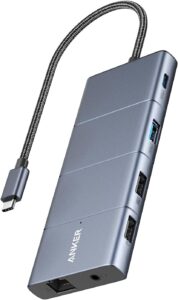
Anker 568 USB-C Hub (11-in-1, USB4)
USB4 40Gbps · 100W Laptop Charging · Triple 4K Display · 8K Single Monitor · Dual 30W Front USB-C · Windows 10+ Only
Best for: Windows users with a USB4 or Thunderbolt 4 laptop who want triple-monitor capability and fast front-accessible charging from a single dock — at a lower price than premium Thunderbolt docks.
The Anker 568 runs on USB4 technology, which delivers identical 40Gbps bandwidth to Thunderbolt 4. In practice, that means this dock performs on par with much pricier TB4 alternatives for data transfer and display output. The upstream USB4 port supports 100W laptop charging — up to 85W actually reaching your laptop after the dock’s 15W internal consumption. Connect a single monitor via DisplayPort for a stunning 8K display, or spread across three monitors at up to 4K resolution using the HDMI 2.0 port and two DisplayPort outputs.
The front panel is the Anker 568’s key differentiator. Two 10Gbps USB-C ports each supply 30W of charging — meaning you can fast-charge a phone and tablet simultaneously through the front while your laptop draws full power from the rear. The Anker Dock Manager app keeps firmware current with new hardware releases. One critical note confirmed by Anker directly: this dock is not recommended for use with MacBooks and is designed for Windows 10 or later only.
Triple 4K
Display Support
✅ Pros
- USB4 = 40Gbps — matches Thunderbolt 4
- 100W laptop charging at the upstream port
- Triple 4K display output (HDMI + 2× DP)
- Single 8K display via DisplayPort
- Dual front USB-C with 30W charging each
- Anker Dock Manager for firmware updates
❌ Cons
- Not recommended for MacBook by Anker
- Windows 10+ only
- No SD card reader
- USB-C data ports don’t support video out
⭐ ClarityPick Verdict
For Windows power users who want triple-monitor output, 100W laptop charging, and front-facing fast charging ports without paying CalDigit prices, the Anker 568 is the pick. USB4 delivers genuine 40Gbps throughput and the dual 30W front ports are a feature you won’t find elsewhere at this price. Just confirm your laptop is Windows and has a USB4 or Thunderbolt 4 port before buying.
Price changes daily — click to see today’s price
🥉 #3 Satechi USB-C Multiport Adapter V3 — Best for MacBook
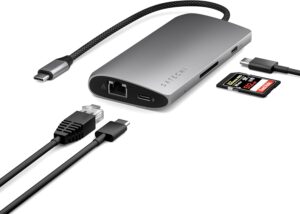
Satechi USB-C Multiport Adapter 8K with Ethernet V3
8 Ports · 8K HDMI 2.1 · UHS-II SD Card · 85W Passthrough · 3× 10Gbps USB-C · Slim Aluminum · Mac + Windows
Best for: MacBook Air and MacBook Pro users who want a portable hub that matches their laptop’s finish, includes a professional-grade UHS-II SD card reader for camera workflows, and supports 8K HDMI output without needing a separate adapter.
Satechi builds hubs specifically for Apple hardware, and the V3 is their best yet. The slim chamfered aluminum enclosure comes in Silver, Space Gray, and Midnight — all designed to match current MacBook colorways exactly. Macworld reviewed it as the adapter MacBook users “could do no better than” for a home or office dock setup. The 8K HDMI 2.1 port supports 8K/30Hz and 4K/144Hz on Windows, though Apple’s macOS caps HDMI output at 4K/60Hz regardless of hardware — a macOS limitation, not a Satechi one.
The port selection is carefully chosen rather than simply maxed out. Three 10Gbps USB-C data ports plus one 5Gbps, a full UHS-II SD card reader (three times faster than standard UHS-I), gigabit Ethernet, and 85W passthrough charging from a 100W input. Four USB-C ports with no USB-A means this is a fully future-forward hub designed for MacBook users who’ve already moved on. The integrated braided cable tail is non-removable, which keeps the design clean but limits flexibility if your laptop port position makes a tethered cable awkward.
✅ Pros
- Matches MacBook Silver, Space Gray, Midnight
- 8K HDMI 2.1 — top-tier display output
- UHS-II SD — fastest card reader at this size
- Three 10Gbps USB-C data ports
- 85W passthrough in compact form factor
- No drivers — plug and play on Mac + Windows
❌ Cons
- No USB-A ports — USB-C only
- macOS limits HDMI to 4K/60Hz max
- No microSD slot — full SD only
- Non-removable cable tail
⭐ ClarityPick Verdict
The Satechi V3 is the hub we’d personally choose for a MacBook setup. The UHS-II SD card reader is a specification you won’t find in hubs at twice the price, the design is excellent, and it’s completely plug-and-play with Apple hardware. If you’re still using USB-A devices daily, add a small adapter — but for the modern MacBook user, this is the cleanest and most capable portable hub available in 2026.
Price changes daily — click to see today’s price
#4 Belkin Connect Pro USB-C Hub — Best Laptop Stand Hub
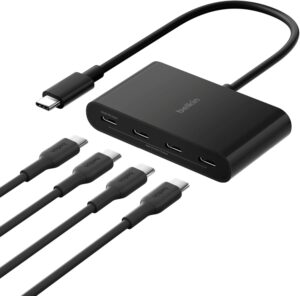
Belkin Connect Universal USB-C 11-in-1 Pro Dock
11 Ports · Triple Monitor Support · 100W PD · 2.5GbE Ethernet · Silicon Motion Tech · Doubles as Laptop Stand · 2-Year Warranty
Best for: Home office workers who want a hub that raises their laptop to eye level and eliminates cable clutter simultaneously — with triple monitor support and 2.5GbE Ethernet for a complete permanent desk setup.
Belkin’s Connect Pro solves two desk problems at once: it’s a full 11-port USB-C hub and a wedge-shaped laptop stand in a single unit. Tom’s Guide reviewed it as a dock that “delivers plenty of functionality” while noting the ergonomic stand design genuinely tidies workspaces. The wedge raises your laptop screen toward eye level, improving posture, and the full peripheral setup lives permanently in the hub while you connect with a single cable. The housing is made with a minimum of 72% post-consumer recycled content — a detail worth noting for environmentally conscious buyers.
Triple monitor support uses Silicon Motion technology, which requires downloading a driver before first use — a small setup step but worth being aware of upfront. The primary HDMI port supports 4K/60Hz, a second HDMI runs at 4K/30Hz, and a VGA port covers legacy displays. The 2.5GbE Ethernet port gives you above-gigabit network speeds, and 100W PD pass-through handles even demanding 16-inch laptops at full charge speed. The built-in Kensington lock slot adds physical security — useful in shared office environments. Compatible with Mac, Windows, and Chromebook.
✅ Pros
- Doubles as laptop stand — raises screen to eye level
- Triple monitor support via Silicon Motion
- 100W PD — charges demanding laptops at full speed
- 2.5GbE Ethernet for fast wired networking
- Built-in Kensington lock for office security
- 72% recycled housing — eco-conscious build
- Mac + Windows + Chromebook compatible
❌ Cons
- Silicon Motion requires driver download before use
- Second HDMI limited to 4K/30Hz (not 60Hz)
- Bulkier than portable hubs — desk-only really
- Not for intensive production or gaming workflows
⭐ ClarityPick Verdict
The Belkin Connect Pro earns its place for one reason: no other hub on this list is also a laptop stand. For home office users who sit at a fixed desk, the ergonomic benefit of raising your screen plus the triple monitor output and 2.5GbE Ethernet is a genuinely compelling combination. Download the Silicon Motion driver before your first use, and this hub delivers everything a multi-monitor home setup needs.
Price changes daily — click to see today’s price
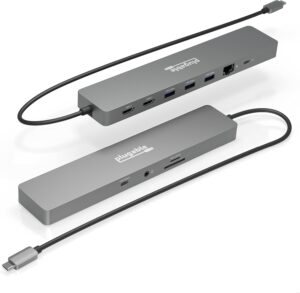
#5 Plugable 11-in-1 USB-C Hub — Best Budget Pick
Plugable 11-in-1 USB-C Hub (USBC-11IN1E)
11 Ports · Dual 4K@60Hz HDMI · 100W Pass-Through · Completely Driverless · Gigabit Ethernet · SD + microSD · 2-Year US Warranty
Best for: Hybrid workers who commute between home and office and need dual 4K monitor support, 100W laptop charging, and a driverless hub compact enough to live in a laptop bag permanently — without spending premium dock prices.
Plugable built the USBC-11IN1E for one specific type of user: the hybrid worker who needs a full desk setup at both locations without paying twice. Two HDMI ports each output at 4K/60Hz — on Windows and Chrome OS you get true dual extended displays at full resolution simultaneously. Mac users get one extended 4K display and one mirrored display due to macOS limitations. The 100W USB-C pass-through keeps the laptop fully charged through the hub with up to 92W actually reaching the laptop after the hub’s 8W internal use.
The completely driverless design is a genuine selling point — plug it in and it works immediately on Windows 10+, macOS 11+, and Chromebooks, with zero driver installation required. Plugable confirms dual 4K@60Hz via HDMI requires your laptop to support DisplayPort 1.4 or Thunderbolt 4 over USB-C. Three USB 3.0 (5Gbps) ports, one USB-C (5Gbps) data port, SD and microSD card slots, gigabit Ethernet, and a 3.5mm audio jack cover every daily-use peripheral. Plugable backs every product with a 2-year warranty and Seattle-based email support — stronger post-sale coverage than most alternatives at this price.
✅ Pros
- Dual 4K@60Hz HDMI — true dual extended on Windows
- 100W pass-through charging (92W to laptop)
- Completely driverless — plug in and works instantly
- SD + microSD card slots included
- Compact enough to carry in a laptop bag daily
- 2-year warranty with US-based email support
❌ Cons
- Mac limited to 1 extended + 1 mirrored display
- USB ports at 5Gbps (not 10Gbps)
- Gigabit Ethernet only — not 2.5GbE
- Dual 4K@60Hz needs DP 1.4 or TB4 laptop port
⭐ ClarityPick Verdict
For the price, the Plugable 11-in-1 is outstanding. Dual 4K@60Hz HDMI, 100W pass-through, driverless setup, and a 2-year US warranty in a hub small enough to travel with daily. If you’re a Windows or Chrome OS user building a budget dual-monitor setup, or a hybrid worker who needs one hub for both locations, this is the pick. Mac users looking for true dual extended displays should look higher up this list.
Price changes daily — click to see today’s price
USB-C Hub Buyer’s Guide 2026
Choose the CalDigit TS4 if…
You run a professional Mac or Windows workstation with a permanently fixed desk setup, need the maximum port count available, want 98W laptop charging and dual 6K display support from a single cable, and regularly transfer large files from SD cards. The price is steep — justify it by the number of adapters and hubs it replaces.
Choose the Anker 568 if…
You’re a Windows user with a USB4 or Thunderbolt 4 laptop who needs triple-monitor output, values front-accessible fast charging ports at 30W each, and wants 40Gbps USB4 performance at a lower price than a Thunderbolt dock. Confirmed Windows 10+ only — check your laptop spec before buying.
Choose the Satechi V3 if…
You use a MacBook Air or MacBook Pro, shoot on a camera with SD cards regularly, care about the hub matching your laptop’s finish, and want a compact portable hub rather than a permanent desk dock. The UHS-II SD reader is a standout specification at this size and price.
Choose the Belkin Connect Pro if…
You work at a fixed home office desk, want your laptop raised to eye level without a separate stand, need triple monitor support, and value 2.5GbE Ethernet for fast wired networking. Remember to download the Silicon Motion driver before first use.
Choose the Plugable 11-in-1 if…
You’re a hybrid worker who carries your hub between home and office, need dual 4K monitor support without paying premium prices, and want something that works the moment you plug it in with no driver downloads or setup. The best value-for-money pick on this list.
Thunderbolt 4 vs USB4 — what’s the difference?
In everyday use, very little. Both standards deliver 40Gbps bandwidth, support the same display specs, and provide the same charging capabilities. Thunderbolt 4 is Intel’s certified version — it requires compliance testing and carries the Intel branding. USB4 is the open version used by the Anker 568 that achieves identical performance without the Intel certification. For the vast majority of use cases, you won’t notice a difference in real-world performance.
How much power delivery does your laptop need?
Most 13-inch MacBook Air and thin Windows laptops charge comfortably at 65–85W. The 16-inch MacBook Pro and high-performance Windows laptops like the Dell XPS 15 or Razer Blade need at least 96W to maintain charge under load. All five hubs on this list deliver at least 85W — the CalDigit TS4 leads at 98W, with the Anker 568, Belkin, and Plugable all at 100W input (with 8–15W used internally by the hub).
Frequently Asked Questions
Will any of these hubs work with both MacBook and Windows laptops?
The CalDigit TS4, Satechi V3, Belkin Connect Pro, and Plugable 11-in-1 are all fully compatible with Mac and Windows. The Anker 568 is the exception — Anker explicitly does not recommend it for MacBook use and lists Windows 10 or later as the requirement.
Can I connect two monitors through a USB-C hub?
Yes on Windows — every hub on this list supports dual extended displays on Windows. On Mac, it depends on your chip. M1 and M2 MacBook Air models support only one external display natively; M1 Pro, M2 Pro, M3, M4 chips support two. The Anker 568 supports three monitors simultaneously on Windows. The Plugable 11-in-1 gives you dual 4K@60Hz on Windows via its two HDMI ports — on Mac you get one extended and one mirrored.
Do any of these require driver downloads to work?
The CalDigit TS4, Anker 568, Satechi V3, and Plugable 11-in-1 are all plug-and-play with no driver downloads. The Belkin Connect Pro requires downloading Silicon Motion software before you can use its triple monitor capability — it works as a basic single-display hub without it, but the full three-screen feature needs the driver installed first.
Is a USB-C hub the same as a Thunderbolt 4 dock?
Not always. A dedicated Thunderbolt 4 dock like the CalDigit TS4 runs on Intel’s TB4 standard at 40Gbps and carries the official certification. A standard USB-C hub runs on USB 3.2 at 5–10Gbps and costs less. The Anker 568 sits in between — it uses USB4, which delivers identical 40Gbps bandwidth to TB4 without the Intel certification branding. For most workflows, the practical difference between USB4 and Thunderbolt 4 is negligible.
Do these hubs charge my laptop while I use them?
Yes — all five hubs on this list support pass-through charging, meaning you connect your existing laptop charger to the hub’s PD port and the hub delivers charge to your laptop while all other ports are in use simultaneously. Actual wattage delivered to your laptop is slightly less than the charger’s output because the hub itself consumes 8–15W internally depending on the model. The CalDigit TS4 delivers 98W, making it the best choice for power-hungry 16-inch laptops.
🏁 Final Verdict — Best USB-C Hubs 2026
Every hub on this list solves the same problem — too few ports on a modern laptop — but they do it for very different users and budgets. Here’s where each one wins:
🥇 CalDigit TS4 — Best Overall: 18 ports, 98W, dual 6K, dual UHS-II, 2.5GbE. The only hub that replaces everything on your desk permanently. Worth every penny for a professional daily-driver setup.
🥈 Anker 568 — Best for Windows: USB4 40Gbps, 100W, triple 4K, dual 30W front ports. Thunderbolt 4 performance at a lower price — but Windows only.
🥉 Satechi V3 — Best for MacBook: 8K HDMI 2.1, UHS-II SD, 85W, matches MacBook finishes exactly. The hub Macworld recommends above all others for MacBook users.
Belkin Connect Pro — Best Stand Hub: Triple monitors, 100W, 2.5GbE, and doubles as your laptop stand. The one to buy if desk ergonomics matter as much as connectivity.
Plugable 11-in-1 — Best Budget: Dual 4K@60Hz HDMI, 100W, completely driverless, 2-year US warranty. Docking station features at a hub price. The hybrid worker’s best friend.
Affiliate Disclosure: As an Amazon Associate, we earn from qualifying purchases. This review contains affiliate links at no extra cost to you. Our recommendations are always independent and unbiased. Last Updated: May 2026