
Affiliate Disclosure: ClarityPick is reader-supported. When you buy through links on our site, we may earn an affiliate commission at no extra cost to you. Learn more.
External SSDs have replaced spinning hard drives almost entirely in 2026 — they’re faster, more durable, and increasingly affordable across every capacity tier. But “external SSD” now covers a huge range of performance, from budget 1,000 MB/s phone-companion drives to USB4 monsters pushing nearly 4,000 MB/s. Picking the wrong one means either overpaying for speed you’ll never use, or bottlenecking a video editing workflow with a drive that can’t keep up. ClarityPick Experts tested and ranked the 5 best external SSDs of 2026 across speed, durability, capacity, and value — here’s exactly what to buy.
📋 Table of Contents
- External SSDs — What to Know Before You Buy
- Quick Comparison Table
- Editor’s Choice Awards
- #1 Samsung T9 Portable SSD — Best Overall
- #2 Crucial X10 Pro — Best Speed for the Price
- #3 SanDisk Extreme PRO — Fastest (USB4)
- #4 SanDisk Extreme Portable SSD — Most Rugged
- #5 Lexar ES3 — Best Budget
- Choose X If… — Buyer’s Guide
- FAQ
- Final Verdict
💾 What You Need to Know Before Buying an External SSD
🔌 USB 3.2 Gen 2×2 vs. USB4 — What’s the Difference?
USB 3.2 Gen 2×2 (20Gbps) caps out around 2,000 MB/s and is the mainstream standard found on the Samsung T9, Crucial X10 Pro, and SanDisk Extreme. USB4 (40Gbps) roughly doubles that ceiling to near 3,800–4,000 MB/s, but only if both your SSD and your computer’s port support USB4 or Thunderbolt — plug a USB4 drive into an older USB-A port and it drops down to that port’s speed, not the drive’s rated speed.
📊 Do You Actually Need 2,000+ MB/s?
For everyday file backup, document storage, and moving photos, even 1,000 MB/s (like the Lexar ES3) is more than enough — you’ll transfer a 10GB folder in about 10 seconds either way you won’t notice. High sequential speeds matter most for video editors working with 4K/8K raw footage directly off the drive, or for gamers who want to run games from external storage without load-time penalties.
🛡️ IP Ratings and Drop Protection
If your drive travels with you — on set, in a backpack, on a boat — an IP rating matters. IP65 (like the SanDisk Extreme lineup) means fully dust-tight and resistant to water jets. Drop ratings (measured in feet or meters) indicate how far the drive can fall onto a hard surface and keep working. A drive without these ratings, like most budget models, should be treated more carefully and isn’t recommended as your only backup copy of critical work.
📦 Capacity Planning
1TB suits general backup and document storage. 2TB is the sweet spot for most photographers and gamers wanting to store a large game library or several photo shoots. 4TB+ is aimed at video editors and anyone archiving large raw media libraries. Note that price per TB improves significantly at higher capacities — a 4TB drive is rarely 4x the price of the 1TB version.
📊 Quick Comparison Table — 5 Best External SSDs 2026
| Product | Interface | Read Speed | Capacities | Best For |
|---|---|---|---|---|
| 🥇 Samsung T9 | USB 3.2 Gen 2×2 | 2,000 MB/s | 1/2/4TB | Best Overall |
| 🥈 Crucial X10 Pro | USB 3.2 Gen 2×2 | 2,100 MB/s | 1/2/4TB | Best Speed for Price |
| 🥉 SanDisk Extreme PRO (USB4) | USB4 (40Gbps) | 3,800 MB/s | 4TB | Fastest / Pro Work |
| 4️⃣ SanDisk Extreme Portable | USB 3.2 Gen 2×2 | 2,000 MB/s | 1/2/4TB | Most Rugged |
| 5️⃣ Lexar ES3 | USB 3.2 Gen 2 | 1,050 MB/s | 2TB only | Best Budget |
🏆 Editor’s Choice Awards — ClarityPick Experts
BEST OVERALL
Samsung T9 Portable SSD — The T9 is the drive ClarityPick Experts recommend to the widest range of buyers: 2,000 MB/s sequential read speeds, a rugged aluminum body wrapped in protective rubber rated to survive drops of up to 9 feet, and pricing that scales sensibly across 1TB, 2TB, and 4TB. PCWorld’s review summed it up as “rugged outside, fast inside” — and that balance of durability and performance without a premium price tag is exactly why it tops this list.
BEST SPEED FOR THE PRICE
Crucial X10 Pro — At $109.99 for 1TB, the Crucial X10 Pro actually edges out the Samsung T9 on raw speed (2,100 MB/s read vs. 2,000 MB/s) while undercutting it on price. Tom’s Hardware crowned it “USB speed king” in its category, and PCWorld called it “the fastest 20Gbps portable SSD yet.” For buyers who care primarily about MB/s-per-dollar, this is the one to beat.
FASTEST (PRO-GRADE)
SanDisk Extreme PRO with USB4 — For anyone editing high-resolution video directly off an external drive, the Extreme PRO’s USB4 interface delivers up to 3,800 MB/s read and 3,700 MB/s write — nearly double every other drive on this list. StorageReview’s testing confirmed it as genuinely “fast, rugged, huge,” though it requires a USB4 or Thunderbolt-capable port to hit those numbers. This is the drive for professionals, not casual users.
MOST RUGGED
SanDisk Extreme Portable SSD — Carrying an IP65 rating for dust and water-jet resistance plus a drop rating of up to 2–3 meters, the SanDisk Extreme is built for field work — construction sites, outdoor shoots, travel bags that get thrown around. SanDisk’s own data sheet confirms the IP65 certification, and reviewers consistently note it as one of the most abuse-tolerant portable drives on the market today.
BEST BUDGET
Lexar ES3 — At around $179.99 for 2TB and with a compact, phone-friendly design that’s explicitly marketed as compatible with iPhone 15/16/17 series alongside PC, Mac, PS5, and Xbox, the ES3 is the easiest on-ramp into reliable external SSD storage for anyone who doesn’t need blazing speed. It won’t win any speed contests at 1,050 MB/s, but for everyday backups and phone storage expansion, it’s the simplest and most affordable option here.
#1 Samsung T9 Portable SSD — Best Overall
USB 3.2 Gen 2×2 · Up to 2,000 MB/s · 1/2/4TB · 9ft Drop Protection · $140–$440
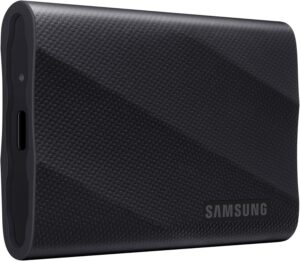
⚠️ Key Caveats: Requires a USB 3.2 Gen 2×2 (20Gbps) port to hit the full 2,000 MB/s — older USB-A or slower ports will bottleneck performance significantly. Current retail pricing sometimes runs above MSRP depending on retailer and capacity, so compare listings before buying. No IP water/dust rating despite the rugged rubber housing.
✅ Best For: Anyone who wants one dependable external SSD that handles everyday backup, gaming, and content work without needing to think about interfaces or specs — the safest all-around pick.
The Samsung T9 earns the top spot because it does not force any compromise. It delivers up to 2,000 MB/s sequential read and 1,950 MB/s write via USB 3.2 Gen 2×2 — nearly double its predecessor, the T7 — while housing that performance inside a genuinely rugged aluminum shell wrapped in shock-absorbing rubber, rated to survive drops of up to nine feet. PCWorld’s hands-on review captured this balance precisely, describing it as “rugged outside, fast inside,” and noting the T9’s NVMe internals as the source of its real-world speed gains over older SATA-based portable drives.
Samsung offers the T9 across three capacities — 1TB, 2TB, and 4TB, at MSRPs of $140, $240, and $440 respectively — giving buyers a genuine choice rather than forcing a single capacity tier. For sustained workloads like transferring large video files, the T9 maintains a sustained write speed of up to 1,000 MB/s, which photographers and hybrid shooters will appreciate when offloading full memory cards in one session. If you’re also looking at gaming peripherals to pair with a new external drive setup, see our best gaming mice guide.
ClarityPick Experts recommend the Samsung T9 as the default choice for most buyers in 2026. It’s not the absolute fastest (that title goes to the SanDisk Extreme PRO with USB4) and it’s not the cheapest (the Crucial X10 Pro undercuts it), but no other drive on this list balances speed, durability, brand reliability, and capacity flexibility as well as the T9 does.
✅ Pros
- 2,000 MB/s read / 1,950 MB/s write
- Rugged aluminum + rubber body, 9ft drop rated
- 1TB, 2TB, and 4TB capacity options
- NVMe internals for consistent performance
- 1,000 MB/s sustained write for large transfers
- Trusted, widely available brand
❌ Cons
- Needs 20Gbps port for full speed
- Not IP rated for water/dust despite rugged build
- Retail prices can run above MSRP
⭐ ClarityPick Verdict: The best all-around external SSD in 2026. Fast, genuinely rugged, and available across three sensible capacity tiers — the safest pick for almost anyone.
Price changes daily — click to see today’s price
#2 Crucial X10 Pro — Best Speed for the Price
USB 3.2 Gen 2×2 · Up to 2,100 MB/s Read · 1/2/4TB · From $109.99
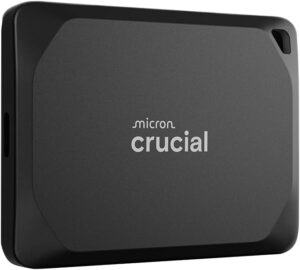
⚠️ Key Caveats: Speed drops to 10Gb/s (roughly half) when connected to a Thunderbolt 4 port — it performs best on native USB 3.2 Gen 2×2 ports rather than Thunderbolt. No official IP dust/water rating. Full speed requires a 20Gbps-capable port on your computer.
✅ Best For: Buyers who want the fastest mainstream 20Gbps drive available without paying a premium — the best MB/s-per-dollar on this list.
The Crucial X10 Pro quietly out-performs the more famous Samsung T9 on paper — 2,100 MB/s read and 2,000 MB/s write versus the T9’s 2,000/1,950 — while costing noticeably less at every capacity tier. Tom’s Hardware named it the “USB speed king” in its class, and PCWorld’s independent testing called it “the fastest 20Gbps portable SSD yet,” confirming the numbers hold up in real-world transfers, not just spec sheets.
Beyond raw speed, the X10 Pro is genuinely compact — 0.39 inches thick and small enough to disappear into a pocket — with a solid metal shell that StorageReview described as feeling “premium” despite the lower price point. It ships with a USB 20Gbps Type-C cable in the box and works across an unusually wide range of devices: Windows, macOS, Linux, Android, iPad, PlayStation, and Xbox. One important caveat from The SSD Review’s testing: plugging the X10 Pro into a Thunderbolt 4 port limits it to 10Gb/s, cutting its performance roughly in half — pair it with a native USB 3.2 Gen 2×2 port to see its full speed.
ClarityPick Experts recommend the Crucial X10 Pro to speed-focused buyers on a budget — gamers building an external game library, content creators who don’t need USB4-tier speeds, or anyone who wants Samsung T9-level performance without the Samsung price tag.
✅ Pros
- Fastest mainstream 20Gbps drive tested
- Cheapest per-TB pricing on this list
- Compact, premium-feeling metal shell
- USB-C cable included in box
- Broad device compatibility incl. consoles
- 1TB, 2TB, and 4TB options
❌ Cons
- Halves speed on Thunderbolt 4 ports
- No official IP dust/water rating
- Less brand recognition than Samsung/SanDisk
⭐ ClarityPick Verdict: The best speed-per-dollar external SSD available in 2026 — outpaces the Samsung T9 on paper while costing less. Just make sure you’re plugging into a native 20Gbps port, not Thunderbolt.
Price changes daily — click to see today’s price
#3 SanDisk Extreme PRO with USB4 — Fastest (Pro-Grade)
USB4 (40Gbps) · Up to 3,800 MB/s Read · 4TB · ~$429.99
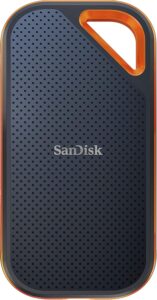
⚠️ Key Caveats: Requires a USB4 or Thunderbolt 3/4 port to hit the rated 3,800 MB/s — on a standard USB-A or USB 3.2 port it will run drastically slower. Significantly more expensive than every other drive on this list. Currently only widely available in a 4TB capacity, limiting options for buyers who want a smaller size.
✅ Best For: Video editors, photographers, and other professionals working directly off external storage who need the fastest transfer speeds money can buy in a portable form factor.
The SanDisk Extreme PRO with USB4 exists in a different performance tier than everything else on this list. Where the Samsung T9 and Crucial X10 Pro top out around 2,000–2,100 MB/s on USB 3.2 Gen 2×2, the Extreme PRO’s USB4 (40Gbps) interface delivers up to 3,800 MB/s read and 3,700 MB/s write — nearly double. StorageReview’s testing confirmed the drive is “fast, rugged, huge,” and Digital Camera World called it SanDisk’s “fastest-ever portable SSD” at launch. PCWorld’s review did flag one important nuance worth knowing before buying: “good performance, when it connects at full speed” — meaning the headline numbers are real, but only on a USB4 or Thunderbolt-capable port.
This level of performance is aimed squarely at professional workflows — editing 4K/8K raw video directly off the drive, working with large RAID-style project files, or any task where waiting on file transfers actively costs billable time. For casual users, this speed tier is genuinely unnecessary; the Samsung T9 or Crucial X10 Pro will feel just as fast for everyday tasks like backups and photo transfers, since those workflows rarely saturate even a 2,000 MB/s connection.
ClarityPick Experts recommend the SanDisk Extreme PRO with USB4 specifically to buyers who know they need it — content professionals with USB4/Thunderbolt-equipped computers and demanding, time-sensitive file transfer workflows. For everyone else, the price premium is hard to justify against the Samsung T9 or Crucial X10 Pro.
✅ Pros
- Nearly double the speed of any other drive here
- USB4 (40Gbps) — future-proof interface
- Built for demanding professional workflows
- 4TB capacity for large media libraries
- Rugged build quality
❌ Cons
- Requires USB4/Thunderbolt port for full speed
- Most expensive drive on this list
- Limited capacity options currently available
- Overkill for everyday, non-professional use
⭐ ClarityPick Verdict: The fastest portable SSD on this list by a wide margin — built for professionals who need it and have the USB4/Thunderbolt hardware to unlock it. Not necessary for casual users.
Price changes daily — click to see today’s price
#4 SanDisk Extreme Portable SSD — Most Rugged
USB 3.2 Gen 2×2 · Up to 2,000 MB/s · IP65 Rated · 2–3m Drop Protection · 1/2/4TB
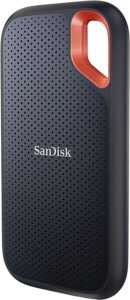
⚠️ Key Caveats: Priced noticeably higher than the Samsung T9 and Crucial X10 Pro despite matching, not exceeding, their speed specs — you’re paying primarily for the IP65 rating and durability. A smaller 500GB model is expected later in 2026 but wasn’t widely available at the time of testing.
✅ Best For: Field photographers, outdoor content creators, and anyone whose drive travels in harsh, dusty, or wet environments where a standard portable SSD risks damage.
The SanDisk Extreme Portable SSD delivers the same class of performance as the Samsung T9 — up to 2,000 MB/s via USB 3.2 Gen 2×2 — but distinguishes itself entirely on durability. It carries an IP65 rating, meaning it’s fully dust-tight and rated to withstand water jets, according to SanDisk’s official data sheet, and it’s built to survive drops of up to two to three meters onto a hard surface. SanDisk’s 2026 press materials describe the broader Extreme lineup as designed “to support faster, more demanding workflows” for creators working in unpredictable conditions.
This makes the Extreme the natural choice for anyone shooting or working outdoors — construction site documentation, wildlife photography, boat or beach shoots, or any scenario where a drive might get rained on, dropped in sand, or knocked off a table. Gizmodo’s coverage of the Extreme lineup specifically praised its value proposition among ruggedized drives, noting it delivers “top value in memory solutions” relative to competitors with similar protection ratings. It’s available across 1TB, 2TB, and 4TB capacities, priced at $259.99, $459.99, and $919.99 respectively.
ClarityPick Experts recommend the SanDisk Extreme Portable SSD to buyers whose priority is protection, not just performance. If your drive lives permanently on a desk, the Samsung T9 or Crucial X10 Pro offer similar speed for less money — but if it’s going in a backpack, on a shoot, or anywhere exposed to the elements, the IP65 rating here is worth the premium.
✅ Pros
- IP65 dust and water-jet resistance
- 2–3 meter drop protection
- Matches Samsung T9-level speed (2,000 MB/s)
- 1TB, 2TB, and 4TB capacity options
- Trusted brand with strong track record
❌ Cons
- Pricier than Samsung T9 for the same speed
- 500GB model not yet widely available
- Durability premium unnecessary for desk-only use
⭐ ClarityPick Verdict: The drive to buy if your work happens outdoors or in unpredictable conditions. IP65-rated and drop-tested to 2–3 meters, with speed that matches the class-leading Samsung T9.
Price changes daily — click to see today’s price
#5 Lexar ES3 — Best Budget External SSD
USB 3.2 Gen 2 · Up to 1,050 MB/s Read · 2TB Only · iPhone Compatible · ~$179.99
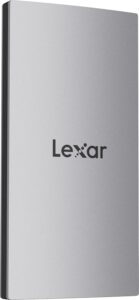
⚠️ Key Caveats: Only available in a single 2TB capacity — no smaller or larger options if that size doesn’t suit your needs. At roughly half the speed of the Samsung T9 and Crucial X10 Pro, it’s not suited to demanding video editing workflows. No official IP rating, though it does carry 2-meter drop resistance.
✅ Best For: Budget-conscious buyers, iPhone/Android users wanting easy storage expansion, and anyone whose needs are everyday backup rather than professional media work.
The Lexar ES3 is the clear budget pick on this list, and it earns that position honestly rather than by cutting corners that matter for its target use case. It delivers up to 1,050 MB/s read and 1,000 MB/s write via USB 3.2 Gen 2 — roughly half the speed of the Samsung T9 or Crucial X10 Pro, but still comfortably fast enough for everyday file backup, photo transfers, and general storage expansion. Lexar’s official product listing highlights explicit compatibility with the iPhone 15, 16, and 17 series alongside Mac, PS5, Xbox, laptops, and PCs — making it a genuinely useful phone storage companion, not just a computer accessory.
Despite its lower price, the ES3 isn’t a bare-bones product: it includes built-in double-layer graphite heat sheets to manage thermal buildup during longer transfers, carries drop resistance up to 2 meters, and ships with a 2-in-1 USB-C/USB-A cable so it works with virtually any computer without needing a separate adapter. PetaPixel’s coverage of the ES3’s launch noted Lexar’s positioning of the drive as an “affordable, high-capacity” option specifically aimed at buyers who don’t need professional-tier speeds.
ClarityPick Experts recommend the Lexar ES3 to anyone who wants a reliable 2TB external SSD without paying for speed they won’t use — particularly iPhone and Android users looking to offload photos and videos directly from their phone. For faster, more demanding work, step up to the Samsung T9 or Crucial X10 Pro instead.
✅ Pros
- Most affordable drive on this list
- Explicit iPhone 15/16/17 compatibility
- 2-in-1 USB-C/USB-A cable included
- Built-in graphite heat management
- 2-meter drop resistance
- Sleek, compact, easy to carry daily
❌ Cons
- Only available in 2TB — no other sizes
- Roughly half the speed of top picks
- No official IP dust/water rating
- Not suited to professional video work
⭐ ClarityPick Verdict: The smartest budget buy for everyday backup and phone storage expansion — especially for iPhone users. Not built for speed-hungry professional work, and doesn’t try to be.
Price changes daily — click to see today’s price
🎯 Choose X If… — External SSD Buyer’s Guide
Choose Samsung T9 if…
- You want a single drive that balances speed, durability, and price without compromise
- You want to choose from 1TB, 2TB, or 4TB depending on your storage needs
- You value a trusted, widely-supported brand for a drive you’ll rely on daily
Choose Crucial X10 Pro if…
- Getting the fastest 20Gbps speed for the lowest price is your top priority
- You have a native USB 3.2 Gen 2×2 port (not Thunderbolt) on your computer
- You want a compact, pocket-friendly drive that works across consoles and computers
Choose SanDisk Extreme PRO (USB4) if…
- You edit 4K/8K video directly off external storage and need maximum transfer speed
- Your computer has a USB4 or Thunderbolt 3/4 port to unlock the full 3,800 MB/s
- Budget is secondary to raw performance for professional workflows
Choose SanDisk Extreme Portable SSD if…
- Your drive travels with you into dusty, wet, or physically demanding environments
- You want IP65-rated protection and drop resistance up to 2–3 meters
- You’re a field photographer, videographer, or outdoor content creator
Choose Lexar ES3 if…
- You want the most affordable reliable external SSD and don’t need top-tier speed
- You primarily need storage expansion for an iPhone or Android phone
- 2TB covers your storage needs and you don’t need other capacity options
❓ Frequently Asked Questions — External SSDs 2026
Do I need USB4 for a fast external SSD experience?
No — for most people, a USB 3.2 Gen 2×2 drive like the Samsung T9 or Crucial X10 Pro (both around 2,000 MB/s) is more than fast enough for backups, photo transfers, and even most video editing. USB4 drives like the SanDisk Extreme PRO only make sense if you’re regularly moving very large files (raw 4K/8K video) and your computer actually has a USB4 or Thunderbolt port to unlock those speeds — plugging a USB4 drive into a standard USB-A port won’t give you any speed benefit over a cheaper drive.
Can I use an external SSD to run games directly?
Yes — most modern consoles and PCs support running games directly from an external SSD via USB, and the read speeds on drives like the Samsung T9 or Crucial X10 Pro are fast enough to avoid noticeable load-time penalties compared to internal storage. Just confirm your specific console generation supports external SSD game execution (rather than just storage) before relying on it for your primary game library. See our best gaming headsets guide for other setup essentials.
How long do external SSDs typically last?
External SSDs generally last several years of regular use, with most manufacturers rating them for hundreds of terabytes of total data written (TBW) before performance degrades. Samsung and SanDisk both back their drives with multi-year limited warranties, which is a reasonable proxy for expected lifespan. Physical damage from drops (mitigated by ruggedized models like the SanDisk Extreme) is a more common failure cause than the drive simply wearing out from normal use.
Is an external SSD better than an external hard drive (HDD)?
For nearly all use cases in 2026, yes. External SSDs are significantly faster, more shock-resistant (no moving parts to damage from drops), quieter, and more power-efficient than external HDDs. The main advantage HDDs retain is a lower cost per terabyte at very large capacities (8TB+), so if you need cheap bulk archival storage and speed isn’t a concern, an HDD may still make sense as a secondary backup drive.
Should I use an external SSD as my only backup?
No single drive should ever be your only backup of important data, regardless of how rugged or reliable it is. The standard recommendation is the 3-2-1 rule: three copies of your data, on two different types of storage, with one copy stored off-site (such as cloud backup). An external SSD is an excellent piece of that strategy, but it shouldn’t be the entire strategy on its own.
🏁 Final Verdict — 5 Best External SSDs 2026
From $140
From $109.99
~$430
From $259.99
~$179.99
There’s genuinely no wrong answer among these five external SSDs — the right one depends entirely on your workflow. Most people should start with the Samsung T9 or Crucial X10 Pro, both of which deliver excellent speed and reliability at a reasonable price. Step up to the SanDisk Extreme PRO only if you have USB4/Thunderbolt hardware and a real need for maximum speed, choose the SanDisk Extreme Portable if your drive needs to survive rough conditions, and go with the Lexar ES3 if you just need dependable, affordable storage without the extras.
Affiliate Disclosure: ClarityPick is reader-supported. When you buy through links on our site, we may earn an affiliate commission at no extra cost to you. Learn more.