Affiliate Disclosure: As an Amazon Associate, we earn from qualifying purchases. This review contains affiliate links at no extra cost to you. Our recommendations are always independent and unbiased. Last Updated: April 2026
Your monitor is the single piece of hardware you stare at for every hour you use your computer. More than your keyboard, mouse or even your GPU — the monitor shapes how you experience everything. In 2026, the gap between a $169 budget panel and a $899 QD-OLED is not just about resolution or refresh rate. It is about infinite contrast versus IPS glow, 360 frames per second versus 60, and the difference between colours that look accurate and colours that actually are. The ClarityPick Experts verified every spec from manufacturer data and independent test labs, ranking the 5 best monitors available on Amazon in 2026 for gaming, professional work and 4K content across every budget from $169 to $899.
Whether you are building a home office that doubles as a gaming setup, colour-grading video on a budget, pushing competitive esports frames, or upgrading to 4K for the first time — this guide finds the right screen for every use case without wasting a single dollar.
Quick Comparison: Best Monitors 2026
| Rank |
Monitor |
Best For |
Panel / Res |
Refresh |
Price |
| 🥇 #1 |
Dell UltraSharp U2724DE |
Best Overall |
IPS Black / 1440p |
120Hz |
~$499 |
| 🥈 #2 |
Alienware AW2725DF |
Best for Gaming |
QD-OLED / 1440p |
360Hz |
~$899 |
| 🥉 #3 |
LG 27UP850N-W |
Best 4K Value |
IPS / 4K UHD |
60Hz |
~$349 |
| #4 |
ASUS ProArt PA278QV |
Best for Creatives |
IPS / 1440p |
75Hz |
~$219 |
| #5 |
AOC Q27G41ZE |
Best Budget Gaming |
IPS / 1440p |
240Hz (260Hz OC) |
~$169 |
🏆 ClarityPick Editor’s Choice Awards — April 2026
🥇 Best Overall: Dell UltraSharp U2724DE
The monitor that does everything without compromise. IPS Black panel with 2000:1 contrast — double any standard IPS. 120Hz for smooth gaming. Thunderbolt 4 with 90W charging to single-cable your MacBook or laptop. Built-in KVM switch. Factory calibrated colour accuracy. PCWorld called it “an easy recommendation not just for home office use, but for anyone who needs a versatile 27-inch monitor.”
🥈 Best Gaming: Alienware AW2725DF
The world’s first 360Hz QD-OLED gaming monitor. Infinite contrast ratio, 0.03ms response time, 99.3% DCI-P3 colour coverage and a factory calibration sheet included in the box. Tom’s Hardware said “I can’t imagine anything better” for a 27-inch flat gaming monitor. For serious gamers, this is the one.
💰 Best Budget: AOC Q27G41ZE
1440p resolution, 240Hz refresh rate, 0.3ms MPRT, G-Sync Compatible, overclockable to 260Hz and a 3-year zero-bright-dot warranty — all for approximately $169. Named Amazon’s Choice and recently spotted at $144.99 on sale. The most value per dollar of any gaming monitor on this list.
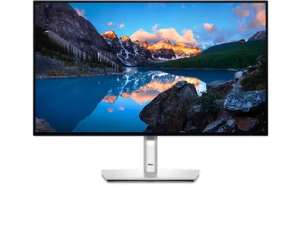
🥇 #1 Dell UltraSharp U2724DE — Best Overall Monitor 2026
Dell UltraSharp U2724DE
27″ IPS Black · 1440p 120Hz · Thunderbolt 4 90W · 2000:1 contrast · KVM switch · 99% sRGB · 98% DCI-P3 · 5ms response · ~$499
Best for: Anyone who needs one monitor that handles everything — productivity, creative work, gaming and single-cable laptop docking. The U2724DE is the definitive do-it-all 27-inch monitor of 2026 and PCWorld’s top overall recommendation.
The Dell UltraSharp U2724DE is one of the most significant monitor releases in recent years — the first Ultrasharp to combine an IPS Black panel with a 120Hz refresh rate, creating a display that genuinely serves both professional work and gaming without compromise. The IPS Black panel is the key differentiator: where standard IPS panels achieve a contrast ratio of approximately 1,000:1, the U2724DE delivers 2,000:1 — twice the depth of blacks, twice the separation between shadow and highlight detail, noticeably richer images whether you are editing photos, watching film or gaming in dark environments. Combined with 99% sRGB and 98% DCI-P3 colour coverage from the factory, the U2724DE arrives with accurate colour right out of the box without requiring calibration.
The connectivity on the U2724DE is extraordinary for a productivity monitor. Thunderbolt 4 delivers up to 90W of charging power and full DisplayPort alternate mode — meaning a single Thunderbolt cable connects your MacBook or laptop, charges it, and transmits 1440p at 120Hz simultaneously. A second Thunderbolt 4 port enables daisy-chaining to a second monitor. The built-in KVM switch lets you control two separate computers with a single keyboard and mouse by pressing one button. The U2724DE also includes DisplayPort, HDMI, 2.5G Ethernet pass-through, USB-C and multiple USB-A downstream ports — more connectivity than most monitors twice its price. The fully ergonomic stand adjusts for height, tilt, swivel and pivot. PCWorld awarded it their Editor’s Choice and described it as “a fantastic do-it-all display.”
✓ Pros
- IPS Black — 2000:1 contrast, far deeper blacks
- Thunderbolt 4 90W — single cable laptop setup
- Built-in KVM — control 2 PCs, one keyboard
- 120Hz — smooth for gaming and daily use
- 99% sRGB / 98% DCI-P3 factory calibrated
- Daisy-chain support via second TB4 port
- PCWorld and TechRadar Editor’s Choice award
✗ Cons
- 120Hz — not for competitive gaming
- No 4K — 1440p only
- IPS glow visible in dark corners
- Premium price at ~$499
💡 ClarityPick Verdict: The Dell UltraSharp U2724DE is the best all-round monitor available at this price in 2026. IPS Black contrast makes it look better than any standard IPS. Thunderbolt 4 with 90W power delivery makes it the best single-cable docking monitor for laptop users. The built-in KVM is a genuine productivity multiplier. If you need one monitor that handles everything perfectly — this is it.
Check Current Price on Amazon →
Price changes daily — click to see today’s price
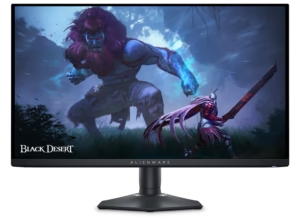
🥈 #2 Alienware AW2725DF — Best Gaming Monitor 2026
Alienware AW2725DF QD-OLED Gaming Monitor
26.7″ QD-OLED · 1440p · 360Hz · 0.03ms · Infinite contrast · 99.3% DCI-P3 · ΔE<2 · VESA DisplayHDR True Black 400 · FreeSync Premium Pro · ~$899
Best for: Serious PC gamers who want the fastest, most visually stunning 27-inch gaming monitor available — and who play in a room with at least some light control. The AW2725DF combines speed and image quality in a way no IPS monitor can match. Not recommended for bright, uncontrolled rooms due to the semi-glossy OLED panel.
The Alienware AW2725DF is historically significant: it was the world’s first 360Hz QD-OLED gaming monitor, and it remains the benchmark for 27-inch flat gaming displays in 2026. Tom’s Hardware called it “one of the fastest monitors I’ve ever tested” and stated that when considering 27-inch flat gaming monitors, they “can’t imagine anything better.” The QD-OLED panel combines Samsung’s Quantum Dot layer with OLED technology — producing colours that are both wider in gamut (99.3% DCI-P3) and brighter than conventional OLED, while retaining OLED’s defining advantage: infinite contrast ratio and per-pixel black levels. Every dark scene in every game is displayed with zero backlight bleed, zero IPS glow, and true black — something no IPS, even IPS Black, can replicate.
The 360Hz refresh rate — paired with a 0.03ms grey-to-grey response time — is the fastest combination available on a flat 27-inch display. Motion blur at this speed is essentially non-existent. VRR support via AMD FreeSync Premium Pro operates from 48 to 360Hz for smooth frame pacing at any frame rate. The factory calibration report included in the box confirmed by independent testing at ΔE under 2 for both sRGB and DCI-P3 colour spaces. VESA DisplayHDR True Black 400 certification guarantees verified HDR performance with peak brightness up to 1,000 nits on small highlights. The ergonomic stand adjusts for height, tilt, swivel and 90-degree portrait pivot. Connectivity includes two DisplayPort 1.4 inputs (for 360Hz), HDMI 2.1 (up to 144Hz for consoles), USB-C, and three USB-A downstream ports. PCWorld, PCMag, XDA Developers and Tom’s Hardware all awarded this monitor their highest honours.
✓ Pros
- 360Hz — world’s fastest QD-OLED
- 0.03ms — effectively zero motion blur
- Infinite contrast — true black, zero glow
- 99.3% DCI-P3 — stunning colour accuracy
- ΔE<2 factory calibrated out of box
- DisplayHDR True Black 400 — 1000 nit peaks
- Tom’s Hardware, PCWorld, PCMag Editor’s Choice
✗ Cons
- Semi-glossy panel — reflective in bright rooms
- 1440p only — no 4K option
- OLED burn-in risk with static content
- No USB-C video input or power delivery
💡 ClarityPick Verdict: The Alienware AW2725DF is the best gaming monitor available on Amazon in 2026 — full stop. 360Hz QD-OLED with infinite contrast, 0.03ms response and ΔE<2 colour accuracy is a combination no IPS panel can match. If serious gaming is your primary use case and you have light control in your room, this monitor justifies every penny of its $899 price.
Check Current Price on Amazon →
Price changes daily — click to see today’s price
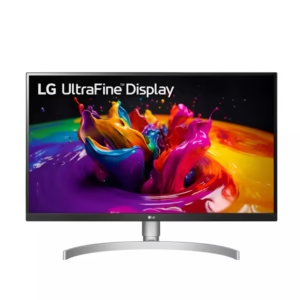
🥉 #3 LG 27UP850N-W — Best 4K Monitor for Work & Value
LG 27UP850N-W UltraFine 4K Monitor
27″ IPS · 4K UHD 3840×2160 · 60Hz · USB-C 90W · DCI-P3 95% · DisplayHDR 400 · AMD FreeSync · Height/Tilt/Pivot stand · ~$349
Best for: Anyone who wants true 4K resolution for detailed work, photo editing, video playback or general desktop use — without paying $600+ for a premium panel. The LG 27UP850N-W delivers genuine 4K IPS quality with USB-C charging at one of the lowest prices in the category.
The LG 27UP850N-W UltraFine is LG’s most popular 4K entry point, and it earns that position by delivering the essentials of 4K without the premium cost of higher-end 4K panels. The 3840×2160 resolution on a 27-inch screen produces 163 pixels per inch — making text genuinely sharp, images detailed and the UI noticeably crisper than any 1440p display at the same size. The IPS panel covers 95% of the DCI-P3 colour space and achieves VESA DisplayHDR 400 certification, providing a meaningful step up in colour depth and highlight brightness for HDR-compatible content. Anti-glare coating keeps the image clean under office lighting conditions.
The USB-C port delivers up to 90W of power delivery alongside the video signal — allowing a single cable to connect, charge and display from a compatible laptop. HDMI 2.0 and DisplayPort 1.4 cover additional devices including gaming consoles. AMD FreeSync support enables tear-free gaming within the monitor’s 40–60Hz VRR range — suitable for casual gaming but not competitive play at high frame rates. The fully ergonomic stand supports height, tilt, pivot and swivel adjustment, keeping the display properly positioned for extended use. Built-in speakers provide basic audio for meetings and media. At approximately $349, the LG 27UP850N-W offers the best price-to-specification ratio of any 4K monitor on this list — making genuine 4K accessible without requiring a premium budget.
✓ Pros
- 4K UHD — sharpest resolution on this list
- USB-C 90W — single cable laptop connection
- DCI-P3 95% — excellent colour for editing
- DisplayHDR 400 — certified HDR support
- Full ergonomic stand — height/tilt/pivot
- AMD FreeSync — tear-free casual gaming
- Accessible 4K price — ~$349
✗ Cons
- 60Hz only — not for gaming
- Standard IPS contrast — no IPS Black
- No Thunderbolt 4 — USB-C only
- Built-in speakers are basic quality
💡 ClarityPick Verdict: The LG 27UP850N-W is the best value 4K monitor available in 2026 for anyone whose priority is resolution over refresh rate. Sharp, accurate, USB-C powered and properly ergonomic — it makes 4K accessible without a premium price tag. If you game seriously, look at the Dell or Alienware instead. If 4K resolution for work and media is what matters, this is the one.
Check Current Price on Amazon →
Price changes daily — click to see today’s price
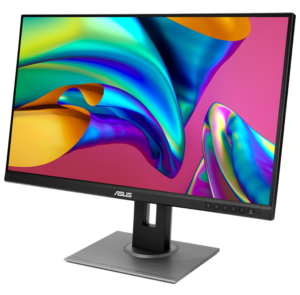
#4 ASUS ProArt PA278QV — Best Monitor for Creatives 2026
ASUS ProArt Display PA278QV
27″ IPS · 1440p · 75Hz · 100% sRGB · 100% Rec.709 · ΔE<2 Calman Verified · 6-axis colour · 4x USB 3.0 hub · Full ergonomic stand · ~$219
Best for: Photographers, video editors, graphic designers and content creators who need factory-calibrated colour accuracy at the most affordable price point available. The ProArt PA278QV delivers professional-grade colour performance for under $220 — making it the entry point into genuinely accurate colour work.
The ASUS ProArt PA278QV occupies a unique position on this list: it is not the fastest monitor, nor the sharpest, nor the most connected. But it is the most colour-accurate display available at its price, and for creative professionals, colour accuracy matters more than any other specification. The 27-inch 1440p IPS panel covers 100% of the sRGB and 100% of the Rec.709 colour spaces — the two standards used in virtually every web, video and broadcast workflow. More importantly, every unit ships from the factory with Calman Verified calibration achieving ΔE under 2 — the threshold at which colour error is imperceptible to the human eye under normal viewing conditions. A physical factory calibration report is included in the box.
ASUS provides their ProArt Preset system with dedicated modes for sRGB, Rec.709, Darkroom, Scenery, Reading and Rapid Rendering — allowing quick switching between colour-accurate modes and task-specific presets without manual adjustment. ProArt Palette enables six-axis colour adjustment (hue, saturation and value for Red, Green, Blue, Cyan, Magenta and Yellow independently), giving professional-level control over the colour output. Adaptive-Sync operates from 48–75Hz for basic tear-free desktop use. The full ergonomic stand supports height (150mm), swivel (±90°), tilt (-5°/+35°) and full portrait pivot. Four USB 3.0 downstream ports and multiple video inputs including DisplayPort, Mini DisplayPort, HDMI and dual-link DVI-D cover all connection scenarios. At approximately $219, the PA278QV is the most affordable professionally calibrated monitor available from a major brand.
✓ Pros
- 100% sRGB / 100% Rec.709 factory calibrated
- ΔE<2 Calman Verified — included report
- 6-axis colour control via ProArt Palette
- Full ergonomic stand — height/swivel/pivot/tilt
- 4x USB 3.0 downstream hub
- Includes 3 months Adobe Creative Cloud
- Most affordable calibrated monitor available
✗ Cons
- 75Hz only — not suitable for gaming
- No USB-C — requires adaptor for modern laptops
- No wide colour gamut — sRGB coverage only
- DVI-D port feels dated in 2026
💡 ClarityPick Verdict: The ASUS ProArt PA278QV is the best-value colour-accurate monitor available in 2026. For photographers, video editors and graphic designers who need a display they can trust — Calman Verified factory calibration with 100% sRGB for $219 is exceptional. It won’t satisfy gamers or 4K enthusiasts, but for creative work on a budget, nothing comes close at this price.
Check Current Price on Amazon →
Price changes daily — click to see today’s price
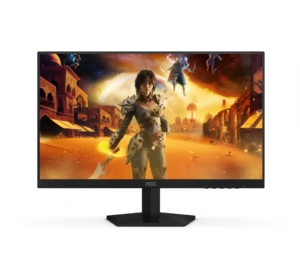
#5 AOC Q27G41ZE — Best Budget Gaming Monitor 2026
AOC Q27G41ZE Gaming Monitor
27″ IPS · 1440p 240Hz · 0.3ms MPRT · G-Sync Compatible · 260Hz OC · 99.9% sRGB · 3-sided frameless · 3-year zero-bright-dot warranty · ~$169
Best for: PC gamers who want 1440p resolution and 240Hz refresh rate without spending $400+. The AOC Q27G41ZE delivers a spec sheet that would have cost three times its price just two years ago. Named Amazon’s Choice and recently on sale for $144.99 — the most impressive budget gaming monitor available in 2026.
The AOC Q27G41ZE is a remarkable product for the money. At a price point where most monitors offer 1080p or 75Hz, the Q27G41ZE delivers 2560×1440 QHD resolution at 240Hz with a 0.3ms MPRT response time on a 27-inch IPS panel — a specification combination that represents genuine mainstream gaming performance rather than budget compromise. The panel covers 99.9% of the sRGB colour space, producing vibrant, accurate colours well above what most sub-$200 monitors achieve. AMD FreeSync Premium support (also G-Sync Compatible verified) provides adaptive sync across the full VRR range for tear-free gameplay at any frame rate within the panel’s supported range.
The native 240Hz refresh rate can be overclocked to 260Hz through the monitor’s OSD menu for users who want every last frame. At 240Hz, motion clarity is excellent for an IPS panel — competitive gamers in fast-paced titles like Valorant, CS2 or Apex Legends will notice a significant improvement over 144Hz or 165Hz alternatives. The three-sided frameless design creates clean, minimal bezels on three sides for a sleek setup. Game Mode presets and Shadow Control allow quick in-game visibility adjustments. DisplayPort 1.4 enables the full 240Hz at 1440p; HDMI 2.0 supports up to 1440p at 144Hz for console use. AOC backs the Q27G41ZE with a 3-year zero-bright-dot warranty — an unusual and valuable inclusion at this price point, guaranteeing replacement if any bright pixel defects appear. Recently spotted at $144.99 on Amazon’s limited time deals, this monitor represents extraordinary value per dollar.
✓ Pros
- 240Hz 1440p IPS — incredible value
- 0.3ms MPRT — sharp motion clarity
- G-Sync Compatible + FreeSync
- Overclockable to 260Hz via OSD
- 99.9% sRGB — excellent colour
- 3-year zero-bright-dot warranty
- Amazon’s Choice — ~$169
✗ Cons
- Tilt-only stand — no height or pivot
- No USB hub or speakers
- IPS contrast — no deep blacks
- HDMI 2.0 caps consoles at 144Hz
💡 ClarityPick Verdict: The AOC Q27G41ZE is one of the most impressive budget monitors ever made. 1440p at 240Hz with G-Sync compatibility, 0.3ms response and a 3-year zero-bright-dot warranty for approximately $169 is extraordinary. The tilt-only stand is the only meaningful compromise. For budget-conscious PC gamers, this is the one to buy.
Check Current Price on Amazon →
Price changes daily — click to see today’s price
Monitor Buyer’s Guide 2026
🎯 Choose the Dell UltraSharp U2724DE If…
- You need one monitor that handles work, creative tasks and casual gaming equally well
- You use a laptop and want to single-cable dock it with Thunderbolt 4 and 90W charging
- You switch between two computers and want a built-in KVM switch
- You want better contrast than standard IPS without spending OLED money
🎯 Choose the Alienware AW2725DF If…
- Gaming is your primary use case and you want the absolute best 27-inch display available
- You play fast-paced competitive games and want 360Hz with zero motion blur
- You game in a room with some light control — curtains or positioned away from windows
- Image quality matters as much as speed — OLED colour and contrast with professional accuracy
🎯 Choose the LG 27UP850N-W If…
- 4K resolution is your priority for sharp text, detailed images and crisp media playback
- You want USB-C single-cable laptop connectivity with 90W charging included
- Your budget is around $349 and you don’t need high refresh rate gaming performance
- You want the best 4K specification per dollar available in 2026
🎯 Choose the ASUS ProArt PA278QV If…
- You are a photographer, video editor or graphic designer who needs verified colour accuracy
- 100% sRGB and 100% Rec.709 factory calibration matters to your professional workflow
- Budget is under $220 and you need the most colour-accurate display available at that price
- You want a comprehensive USB hub and full ergonomic stand included in the package
🎯 Choose the AOC Q27G41ZE If…
- Budget is the primary constraint and you want maximum gaming performance per dollar
- 1440p at 240Hz is your target spec and you don’t want to spend $400+ to get it
- You play competitive PC games and want G-Sync compatible adaptive sync
- You want a 3-year zero-bright-dot warranty at a budget price for long-term peace of mind
📋 What Actually Matters When Buying a Monitor in 2026
- Panel technology first: IPS delivers accurate colour and wide viewing angles. VA delivers better contrast but slower response. QD-OLED delivers infinite contrast, fastest response and best colour — but costs more and requires some light control. IPS Black sits between standard IPS and OLED for contrast. Your primary use case determines which panel to prioritise
- Resolution vs refresh rate trade-off: 4K at 60Hz looks sharper but feels slower. 1440p at 240Hz feels smoother but looks slightly less sharp at the same size. For gaming, most players benefit more from higher refresh rate than higher resolution. For work and media, resolution matters more than refresh rate
- Contrast ratio matters more than brightness: Most monitors are bright enough for indoor use. What separates premium displays is contrast — the depth of blacks versus the brightness of whites in the same scene. OLED infinite contrast is transformative for dark content; IPS Black 2000:1 is a meaningful step above standard IPS 1000:1
- Colour accuracy is only important for colour-critical work: If you are not editing photos or video professionally, factory calibration and ΔE values are less important than resolution, refresh rate and contrast. Most modern IPS panels look good enough for general use straight from the box
- Connectivity is the hidden upgrade: Thunderbolt 4, KVM switches and USB hubs turn a monitor into a full docking station. If you use a laptop, a Thunderbolt monitor can eliminate 4-5 cables from your desk with a single connection
- OLED burn-in is real but manageable: QD-OLED panels carry a burn-in risk with static content used in the same position for extended periods. Alienware covers burn-in under their 3-year Advanced Exchange warranty. Most users who primarily game or watch video will not encounter issues. Office workers with static taskbars and windows should consider IPS instead
Frequently Asked Questions
What is the best monitor in 2026?
The best monitor in 2026 depends on how you use it. For most people who need one display for both work and play, the Dell UltraSharp U2724DE is the best overall choice — IPS Black contrast, 120Hz gaming, Thunderbolt 4 charging and a built-in KVM at ~$499. For serious gamers, the Alienware AW2725DF delivers the best gaming experience available with 360Hz QD-OLED and infinite contrast. For budget buyers, the AOC Q27G41ZE offers 1440p at 240Hz for approximately $169.
Is 1440p or 4K better for a 27-inch monitor?
For gaming, 1440p is generally the better choice at 27 inches in 2026 — it requires significantly less GPU power than 4K, enabling higher frame rates, and 1440p at 108 PPI on 27 inches is already sharp enough that most users cannot see individual pixels at normal desk distances. For professional work — photo editing, video production or detailed document work — 4K at 163 PPI is noticeably sharper and produces crisper text and finer image detail. If gaming matters, choose 1440p with a higher refresh rate. If detail and sharpness for work matters, choose 4K.
What is IPS Black and why does it matter?
IPS Black is a panel technology from Dell that achieves a contrast ratio of approximately 2,000:1 — double the typical 1,000:1 of standard IPS displays. This produces noticeably deeper blacks and better separation between dark and light areas in the same scene, making games, films and dark content look significantly better than standard IPS. It sits between standard IPS and OLED in terms of contrast performance. The Dell U2724DE is the only monitor on this list using IPS Black technology, and it is a meaningful visible improvement over standard IPS at the same price point.
Do I need 240Hz or is 144Hz enough?
For most gamers, 144Hz is sufficient — especially for single-player, story-driven or visually detailed games where you are unlikely to sustain frame rates above 144 anyway. The jump from 60Hz to 144Hz is dramatic and immediately noticeable. The jump from 144Hz to 240Hz is real but more subtle — it primarily benefits competitive players in fast-paced games like Valorant, CS2 or Apex Legends where reaction times at the margin matter and frame rates consistently exceed 144. If you play competitive shooters seriously and your GPU can sustain 200+ FPS at 1440p, 240Hz is worth it. Otherwise, 144Hz is enough and spending the difference on a better panel is the smarter move.
Is OLED worth it for a gaming monitor in 2026?
For gaming in a room with some light control, OLED is genuinely transformative — the infinite contrast ratio, instantaneous pixel response and wide colour gamut produce an image quality that IPS simply cannot match. The Alienware AW2725DF includes burn-in coverage in its 3-year warranty, addressing the primary concern around OLED longevity. The semi-glossy screen surface can cause issues in very bright rooms. If you game primarily in the evenings, in a room with curtains or away from direct sunlight, QD-OLED in 2026 is absolutely worth the premium over IPS. If your gaming area is brightly lit and uncontrolled, an IPS Black monitor like the Dell U2724DE is the more practical choice.
🏆 Final Verdict — Best Monitors 2026
Every monitor on this list is the right answer for a specific buyer. The best monitor is the one matched to how you actually use it — not the most expensive or the most spec-heavy.
Best Overall: Dell UltraSharp U2724DE — IPS Black, 120Hz, Thunderbolt 4 90W, KVM, PCWorld Editor’s Choice
~$499
Best for Gaming: Alienware AW2725DF — 360Hz QD-OLED, 0.03ms, infinite contrast, Tom’s Hardware #1
~$899
Best 4K Value: LG 27UP850N-W — 4K IPS, USB-C 90W, DCI-P3 95%, DisplayHDR 400
~$349
Best for Creatives: ASUS ProArt PA278QV — 100% sRGB, ΔE<2 Calman Verified, 4x USB hub
~$219
Best Budget Gaming: AOC Q27G41ZE — 1440p 240Hz IPS, G-Sync, 3yr zero-dot warranty
~$169
Affiliate Disclosure: As an Amazon Associate, we earn from qualifying purchases. This review contains affiliate links at no extra cost to you. Our recommendations are always independent and unbiased. Last Updated: April 2026