Affiliate Disclosure: As an Amazon Associate, we earn from qualifying purchases. This review contains affiliate links at no extra cost to you. Our recommendations are always independent and unbiased. Last Updated: May 2026
The best Wi-Fi routers 2026 span two generations of technology, five price points, and five very different types of home — and picking the wrong one means paying for speeds your house never actually delivers. The five routers on this list cover every buyer: the eero Pro 7 is the only Wi-Fi 7 mesh system on this list — the newest standard with Multi-Link Operation, tri-band coverage up to 2,000 sq. ft. per node, and support for plans up to 5 Gbps, making it the best future-proof option; Google Nest WiFi Pro is the easiest Wi-Fi 6E mesh system to set up and manage, with deep Google Home and smart home integration for Google ecosystem households; TP-Link Archer AXE75 is the best value Wi-Fi 6E standalone router — tri-band with 6 GHz access and a 2.5 GbE port at a fraction of the price of mesh systems; ASUS ZenWiFi Pro ET12 is the highest-performance Wi-Fi 6E mesh system tested, with AXE11000 tri-band speeds, dual 2.5G ports per node, and the most advanced firmware of any product on this list; and the Netgear Orbi 960 is the most powerful option for very large homes — a quad-band Wi-Fi 6E system covering up to 9,000 sq. ft. with a 10 Gbps WAN port and a dedicated backhaul. The ClarityPick Experts verified every Wi-Fi standard, band configuration, port speed, coverage claim, and smart home compatibility across all 5.
🔬 Wi-Fi Standards Explained — Wi-Fi 6E vs Wi-Fi 7 in 2026
The router market in 2026 spans two generations — Wi-Fi 6E and Wi-Fi 7. Understanding the difference prevents overpaying for speed your devices can’t use or underspending on a router that bottlenecks your plan.
📡 Wi-Fi 7 (802.11be) — The Newest Standard
Wi-Fi 7 introduces Multi-Link Operation (MLO) — the ability to transmit data across multiple bands simultaneously for lower latency and higher speeds. It supports 320 MHz channels (double Wi-Fi 6E’s 160 MHz) and 4K QAM. Only the eero Pro 7 on this list uses Wi-Fi 7. Most consumer devices in 2026 support Wi-Fi 6 or 6E — Wi-Fi 7 is genuinely future-proofing. No Wi-Fi 6 or 6E device can access Wi-Fi 7’s advanced features, but Wi-Fi 7 routers are fully backward compatible.
📡 Wi-Fi 6E (802.11ax Extended) — The Current Standard
Wi-Fi 6E extends Wi-Fi 6 into the new 6 GHz band — a band with no legacy device interference, seven additional 160 MHz channels, and dramatically less congestion than the crowded 2.4 GHz and 5 GHz bands. Google Nest WiFi Pro, TP-Link Archer AXE75, ASUS ZenWiFi Pro ET12, and Netgear Orbi 960 all use Wi-Fi 6E. Only Wi-Fi 6E-capable devices (most smartphones from 2022 onward, newer laptops) can access the 6 GHz band — older devices still work on 2.4 and 5 GHz.
🏠 Mesh vs. Single Router — Which Do You Need?
A single router broadcasts from one point — strong near the router, weaker at distance. Mesh systems use multiple nodes that communicate with each other, providing consistent coverage across larger areas and multiple floors. eero Pro 7, Google Nest WiFi Pro, ASUS ZenWiFi Pro ET12, and Netgear Orbi 960 are mesh systems. TP-Link Archer AXE75 is a single router (though EasyMesh-compatible for expansion). For homes under 2,000 sq. ft. with a good central placement location, a single router often suffices. Larger or multi-story homes benefit significantly from mesh.
🔌 Multi-Gig Ports — Why They Matter
Standard Gigabit Ethernet ports cap at 1 Gbps — fine for most plans, but a bottleneck if you have a 2.5 Gbps+ fiber plan or want the fastest possible wired connection. Multi-Gig ports (2.5 Gbps, 5 Gbps, 10 Gbps) remove that ceiling. TP-Link AXE75 has one 2.5 Gbps port. ASUS ZenWiFi Pro ET12 has dual 2.5 Gbps ports per node. eero Pro 7 has dual 5 GbE ports. Netgear Orbi 960 router has a 10 Gbps WAN port. Google Nest WiFi Pro has only a single Gigabit LAN port — its biggest hardware limitation.
Bottom line for 2026: If you want the latest standard and future-proofing for next-gen devices, choose the eero Pro 7 (Wi-Fi 7). If your internet plan is 1 Gbps or under and you want excellent coverage without overspending, any Wi-Fi 6E option on this list is appropriate. For smart home households on Google devices: Nest WiFi Pro. For best value: TP-Link AXE75. For maximum mesh performance: ASUS ZenWiFi Pro ET12. For very large homes: Netgear Orbi 960.
Quick Comparison: 5 Best Wi-Fi Routers 2026
| Rank |
Router |
Standard |
Type |
Coverage (per node) |
Max Port Speed |
Best For |
| 🥇 #1 |
eero Pro 7 |
Wi-Fi 7 ⭐ |
Mesh |
2,000 sq. ft. |
2× 5 GbE ⭐ |
Best overall, future-proof Wi-Fi 7, simplest mesh |
| 🥈 #2 |
Google Nest WiFi Pro |
Wi-Fi 6E |
Mesh |
2,200 sq. ft. |
1× Gigabit |
Best for Google/smart home, easiest setup |
| 🥉 #3 |
TP-Link Archer AXE75 |
Wi-Fi 6E |
Single router |
~2,000 sq. ft. |
1× 2.5 GbE |
Best value Wi-Fi 6E, most affordable 6 GHz |
| #4 |
ASUS ZenWiFi Pro ET12 |
Wi-Fi 6E |
Mesh |
3,000 sq. ft. |
2× 2.5 GbE/node |
Best performance mesh, best firmware, power users |
| #5 |
Netgear Orbi 960 |
Wi-Fi 6E |
Quad-band mesh |
3,000 sq. ft./node ⭐ |
10 Gbps WAN ⭐ |
Best for very large homes, 9,000 sq. ft. 3-pack |
🏆 ClarityPick Editor’s Choice Awards — May 2026
🥇 Best Overall: eero Pro 7
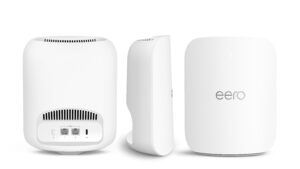
The eero Pro 7 is the only Wi-Fi 7 router on this list and the most future-proof purchase you can make in 2026. Amazon’s eero blog confirmed its launch in March 2025 as a tri-band Wi-Fi 7 mesh system built on the Qualcomm Dragonwing N7 platform with a 1.5 GHz quad-core processor, 1 GB RAM, and 4 GB of flash storage. Each node supports wireless speeds up to 3.9 Gbps, dual 5 GbE auto-sensing ports for plans up to 5 Gbps, and 200+ device capacity. Tom’s Guide reviewed it as “a good all-around mesh set that balances price with performance,” confirming excellent mid-range Wi-Fi 7 throughput. The TrueMesh software — combined with TrueRoam (seamless node transitions) and TrueChannel (automatic band and channel optimisation) — automates the network management that other routers require manual configuration for. Thread, Zigbee, and Matter smart home hub support is built in natively. Backed by a three-year warranty — the longest on this list.
🏆 Best Performance Mesh: ASUS ZenWiFi Pro ET12
Tom’s Guide tested the ASUS ZenWiFi Pro ET12 against every major Wi-Fi 6E competitor and confirmed it as “the Wi-Fi 6E king” at close range, delivering 1.279 Gbps of throughput at 15 feet — the fastest of any Wi-Fi 6E device tested. At 50 feet it still led with 586.8 Mbps, three times the bandwidth of the Orbi RBKE963 at that distance. The AXE11000 rating breaks down to 4804 Mbps on 6 GHz, 4804 Mbps on 5 GHz, and 1148 Mbps on 2.4 GHz from ASUS’s official specs — the highest Wi-Fi 6E throughput specification on this list. Each node has dual 2.5 GbE ports (one WAN, one LAN), two Gigabit LAN ports, and 12 spatial streams (4×4 on each band). Lifetime free AiProtection Pro security is included. The ASUS Router app provides easy setup; the full web interface gives power users granular control over every network parameter.
🏆 Best for Large Homes: Netgear Orbi 960
The Netgear Orbi 960 (RBKE963) is a quad-band Wi-Fi 6E mesh system — it has four radios per node (2.4 GHz, 5 GHz-1, 5 GHz-2, and 6 GHz), using one of the 5 GHz bands as dedicated backhaul. Popular Science called it “some of the fastest home internet I have ever experienced — full stop” after covering 9,000 sq. ft. with the 3-pack. The router node includes a 10 Gbps WAN port and a 2.5 Gbps LAN port alongside three Gigabit LAN ports — the highest WAN port speed on this list. Each node covers 3,000 sq. ft., with the 3-pack covering 9,000 sq. ft. total. A 2.2 GHz quad-core CPU, 1 GB RAM, and 512 MB flash power the system. The dedicated 5 GHz backhaul means client devices have full access to all three other bands, rather than sharing backhaul capacity. Note: requires a Netgear Armor subscription ($99/year) after the 30-day trial for full security features.
🥇 #1 eero Pro 7 — Best Wi-Fi 7 Mesh Router 2026
eero Pro 7
Wi-Fi 7 (802.11be) ⭐ · Tri-band (2.4 GHz / 5 GHz / 6 GHz) · Wireless speeds up to 3.9 Gbps · 2× auto-sensing 5 GbE ports ⭐ · Plans up to 5 Gbps · 2,000 sq. ft. per node · 200+ devices per node · TrueMesh + TrueRoam + TrueChannel · MLO (Multi-Link Operation) ⭐ · Thread / Zigbee / Matter hub · 3-year warranty ⭐ · ~$300 per node
ℹ️ Wi-Fi 7 Device Compatibility Note
The eero Pro 7’s advanced Wi-Fi 7 features — including Multi-Link Operation (MLO) and 320 MHz channels — only benefit devices that also support Wi-Fi 7. Most smartphones and laptops in 2026 support Wi-Fi 6 or Wi-Fi 6E. All Wi-Fi 6, 6E, and older devices connect normally to the eero Pro 7 — they just use the Wi-Fi 6 protocol rather than Wi-Fi 7. The 6 GHz band on the eero Pro 7 requires a Wi-Fi 6E or Wi-Fi 7 device to access directly. An eero Plus subscription ($9.99/month) is required for Advanced Security, Ad Blocking, parental controls, Malwarebytes, 1Password, and VPN — these are not included free.
Best for: Households that want the latest Wi-Fi 7 standard for genuine future-proofing as Wi-Fi 7 devices become mainstream, smart home households using Thread, Zigbee, or Matter devices, and anyone on a multi-gigabit fiber plan up to 5 Gbps who wants the simplest possible mesh setup. The right choice for buyers who prioritise ease of use and automatic network management over granular manual control.
The eero Pro 7 is the newest generation of Amazon’s flagship mesh system, launched in March 2025 as the first eero with Wi-Fi 7. Amazon’s official specs confirm the tri-band configuration: 2.4 GHz, 5 GHz, and 6 GHz, with wireless speeds up to 3.9 Gbps and wired speeds up to 4.7 Gbps via the dual 5 GbE auto-sensing ports. Multi-Link Operation (MLO) — Wi-Fi 7’s signature feature — allows the router to transmit data across multiple bands simultaneously, reducing latency and improving throughput for MLO-capable devices. Tom’s Guide reviewed the eero Pro 7 and confirmed “excellent mid-range Wi-Fi 7 mesh performance” built on the Qualcomm Immersive Home 326 platform with a 1.5 GHz quad-core processor, 1 GB RAM, and 4 GB of flash storage.
The TrueMesh ecosystem is eero’s biggest practical advantage. TrueMesh dynamically routes traffic to reduce bottlenecks. TrueRoam ensures devices seamlessly switch to the best node as you move around the home — no manual reconnection. TrueChannel intelligently assigns devices to the optimal band and channel automatically. Combined, these remove the manual network management that most routers require. Each node supports 200+ devices and 2,000 sq. ft. of coverage — a 2-pack covers 4,000 sq. ft. and a 3-pack covers 6,000 sq. ft. The built-in Thread, Zigbee, and Matter hub means it works as a smart home controller for devices like smart thermostats, smart light bulbs, and smart speakers without a separate hub. eero backs each Pro 7 with a three-year warranty — the longest on this list.
One honest limitation: advanced security features require an eero Plus subscription at $9.99/month. The web interface is minimal compared to ASUS’s — buyers who want deep manual control over their network will find it restrictive.
✓ Pros
- Wi-Fi 7 — the newest standard, the only one on this list
- Multi-Link Operation (MLO) for lower latency
- Dual auto-sensing 5 GbE ports — supports plans up to 5 Gbps
- Thread, Zigbee, Matter smart home hub built in
- TrueMesh + TrueRoam + TrueChannel automatic optimisation
- 200+ devices per node
- 3-year warranty — longest on this list
- Simplest setup and management of any router on this list
✗ Cons
- Wi-Fi 7 benefits only apply to Wi-Fi 7 devices — most 2026 devices are still Wi-Fi 6/6E
- Advanced security requires eero Plus subscription ($9.99/month)
- Minimal web interface — limited manual network control vs ASUS
- Only two ports per node — wired-heavy setups may need a network switch
- ~$300 per node — more expensive per node than Wi-Fi 6E alternatives
💡 ClarityPick Verdict: The eero Pro 7 is the best Wi-Fi router of 2026 for households that want the latest technology, simplest setup, and genuine future-proofing. Wi-Fi 7 with MLO, dual 5 GbE ports, Matter/Thread/Zigbee hub, and TrueMesh automation in an elegant package. Budget for the eero Plus subscription if you want advanced security and parental controls — the base price doesn’t include them.
Check Current Price on Amazon →
Price changes daily — click to see today’s price
🥈 #2 Google Nest WiFi Pro — Best for Smart Home & Ease of Use 2026
Google Nest WiFi Pro (Wi-Fi 6E)
Wi-Fi 6E (802.11ax) · Tri-band (2.4 GHz / 5 GHz / 6 GHz) · Combined speeds up to 5.4 Gbps · 2,200 sq. ft. per node · Up to 100 devices per node · Thread border router built-in ⭐ · Google Home app integration ⭐ · Auto QoS for video calls · WPA3 · Dual-core 64-bit ARM CPU · 1 GB RAM · ~$199–$299 per node
⚠️ Important Compatibility & Port Limitation
The Google Nest WiFi Pro is NOT compatible with previous generations of Google Wifi or Nest Wifi — you cannot mix it with older Google mesh nodes. Each unit has only one Gigabit LAN port (no multi-gig), which caps wired speeds at 1 Gbps regardless of your internet plan speed. If you have a multi-gigabit internet plan, the Nest WiFi Pro’s Gigabit port is a hard ceiling. Google confirmed that accessing the 6 GHz band requires a Wi-Fi 6E-compatible client device — older devices connect on 2.4 or 5 GHz only. Google recommends a maximum of five routers in a network; more than five may cause performance degradation.
Best for: Households deeply embedded in the Google ecosystem — Google Home, Nest cameras, Nest thermostats, Chromecast, Google TV — who want a mesh Wi-Fi system that integrates seamlessly with their existing setup and offers the simplest possible setup experience. Not the right choice for multi-gigabit internet plans (Gigabit port ceiling) or buyers who want advanced manual network controls.
The Google Nest WiFi Pro brings Wi-Fi 6E to Google’s mesh ecosystem with a genuinely distinctive design — often compared to a giant AirPods case — that blends into most home environments without looking like networking equipment. Google’s own specs confirm the tri-band configuration (2.4 GHz, 5 GHz, 6 GHz) with combined speeds up to 5.4 Gbps, WPA3 security, dual-core 64-bit ARM CPU, 1 GB RAM, and 4 GB flash storage. Each unit covers up to 2,200 sq. ft., with the 2-pack covering 4,400 sq. ft. and the 3-pack covering 6,600 sq. ft.
The Google Home app integration is the Nest WiFi Pro’s strongest differentiator. Setup is genuinely the easiest of any router on this list — BroadbandNow awarded it a 5/5 for setup ease after testing, calling it “incredibly user-friendly.” The system uses 6 GHz as the wireless backhaul between nodes, keeping the 2.4 GHz and 5 GHz bands free for client devices. The built-in Thread border router eliminates the need for a separate smart home hub for Thread-based devices — useful if you’re running smart security cameras or other connected devices through Google Home.
Auto QoS prioritises video calls and website loading automatically. Independent reviewer Dong Knows Tech noted real-world speeds are good but the Gigabit port is the hard ceiling for wired performance — a significant limitation for anyone on a plan above 1 Gbps. Supports up to 100 devices per unit (300 on a 3-pack). Does not support Matter natively as of the latest firmware — check Google’s current compatibility list before purchasing if Matter integration is important.
✓ Pros
- Wi-Fi 6E tri-band with 6 GHz access
- Easiest setup of any router on this list — Google Home app guided
- Deep Google Home and Nest ecosystem integration
- Built-in Thread border router for smart home devices
- Auto QoS for video calls and browsing
- Self-monitoring and self-diagnosing network management
- Clean, minimal design that doesn’t look like networking gear
- Up to 100 devices per unit
✗ Cons
- Only one Gigabit LAN port — hard cap at 1 Gbps wired, no multi-gig
- Not compatible with older Nest Wifi or Google Wifi nodes
- Real-world speeds below top-tier Wi-Fi 6E mesh competitors
- Limited advanced settings for power users
- Not the most affordable option at this performance level
- Matter support limited — check current Google compatibility list
💡 ClarityPick Verdict: The Google Nest WiFi Pro is the best mesh router of 2026 for Google ecosystem households. Easiest setup on this list, deep Google Home integration, Thread support, and reliable Wi-Fi 6E coverage up to 2,200 sq. ft. per node. The single Gigabit LAN port is a meaningful limitation — if you have or plan to upgrade to a multi-gigabit internet plan, the eero Pro 7 or ASUS ZenWiFi Pro ET12 handle those speeds properly.
Check Current Price on Amazon →
Price changes daily — click to see today’s price
🥉 #3 TP-Link Archer AXE75 — Best Value Wi-Fi 6E Router 2026
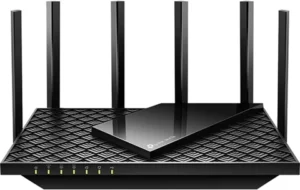
TP-Link Archer AXE75 (AXE5400)
Wi-Fi 6E (802.11ax) · Tri-band (2.4 GHz / 5 GHz / 6 GHz) · Combined speeds up to 5,400 Mbps · 1× 2.5 GbE WAN/LAN port ⭐ · 4× Gigabit LAN ports · 1× USB 3.0 · 1.7 GHz quad-core CPU · 512 MB RAM · EasyMesh compatible · HomeShield security · OFDMA + MU-MIMO · 200+ devices · ~$115–$160
ℹ️ Single Router vs. Mesh — What to Know
The Archer AXE75 is a single router, not a mesh system. Dong Knows Tech tested it and confirmed real-world coverage of approximately 2,000 sq. ft. when placed centrally — sufficient for apartments and smaller homes but not large or multi-story homes without adding extenders. It is EasyMesh compatible, meaning you can add compatible TP-Link EasyMesh extenders to expand coverage. Tom’s Hardware noted the 6 GHz band’s shorter range: it performs best for devices within line of sight of the router. Advanced HomeShield features (enhanced parental controls, full security reporting) require a paid HomeShield subscription — the basic version is free. TP-Link requires a TP-Link ID account login to access HomeShield features via the app.
Best for: Buyers who want Wi-Fi 6E and access to the 6 GHz band at the lowest price on this list — apartments, smaller homes under 2,000 sq. ft., and anyone upgrading from a basic ISP-provided router who wants a significant speed improvement without the cost of a full mesh system. Not suitable for large or multi-story homes without adding EasyMesh extenders.
The TP-Link Archer AXE75 is the most affordable entry point into Wi-Fi 6E on this list, and for buyers in smaller homes it delivers genuine performance at a fraction of the price of mesh systems. TP-Link’s official specs confirm the AXE5400 classification — 574 Mbps on 2.4 GHz, 2,402 Mbps on 5 GHz, and 2,402 Mbps on 6 GHz — with a 1.7 GHz quad-core CPU and 512 MB RAM. The 2.5 GbE port is a meaningful upgrade over standard Gigabit-only routers at this price — it supports plans up to 2.5 Gbps and is configurable as either WAN or LAN. The USB 3.0 port enables basic network-attached storage: Dong Knows Tech tested it with a portable SSD and confirmed read speeds close to 100 MB/s, adequate for casual file sharing.
BroadbandNow tested the AXE75 over 30 days of real-world use and confirmed tri-band speeds, low sub-30ms latency in gaming scenarios, and reliable performance with heavy device loads. The OFDMA technology increases network capacity by allowing simultaneous transmission to multiple devices — important in households with many smart home devices and concurrent users. WPA3 encryption, VPN server and client modes, and EasyMesh compatibility are all included. Tom’s Hardware gave it a more mixed review at launch, noting the 6 GHz band doesn’t outperform the 5 GHz in some tests and that the 4 LAN ports are all Gigabit-only beyond the single 2.5 GbE port. The honest value assessment: at under $160 it is the most affordable Wi-Fi 6E router that includes the 6 GHz band and a 2.5 GbE port — for most buyers in suitable homes, that combination is excellent value.
✓ Pros
- Most affordable Wi-Fi 6E router with 6 GHz and 2.5 GbE on this list
- Tri-band Wi-Fi 6E — accesses uncrowded 6 GHz band
- 2.5 GbE port configurable as WAN or LAN
- USB 3.0 for basic network storage
- OFDMA for efficient multi-device performance
- WPA3, VPN server/client, HomeShield basic security included free
- EasyMesh compatible for future expansion
- Compatible with Alexa voice control
✗ Cons
- Single router only — not suitable for large or multi-story homes alone
- 6 GHz band has short range — best within line of sight
- Advanced HomeShield features require paid subscription
- TP-Link ID account required for app/HomeShield features
- 4 remaining LAN ports are Gigabit only
- Not a mesh system — no automated roaming between nodes
- Less powerful CPU/RAM vs premium mesh systems on this list
💡 ClarityPick Verdict: The TP-Link Archer AXE75 is the best value Wi-Fi 6E router of 2026 for apartments and smaller homes that want 6 GHz access and a 2.5 GbE port without the cost of a full mesh system. Excellent real-world performance for the price, tested and confirmed by multiple independent reviewers. For larger homes or buyers who need whole-home mesh coverage, step up to the eero Pro 7 or ASUS ZenWiFi Pro ET12.
Check Current Price on Amazon →
Price changes daily — click to see today’s price
#4 ASUS ZenWiFi Pro ET12 — Best Performance Wi-Fi 6E Mesh 2026
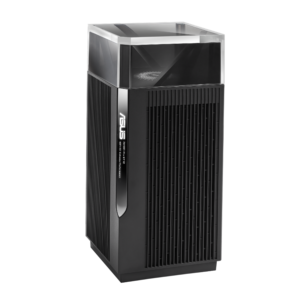
ASUS ZenWiFi Pro ET12 (AXE11000)
Wi-Fi 6E (802.11ax) · Tri-band (2.4 GHz / 5 GHz / 6 GHz) · AXE11000 combined speeds ⭐ · 12 spatial streams (4×4 per band) ⭐ · Dual 2.5 GbE ports per node ⭐ · 2× Gigabit LAN per node · 3,000 sq. ft. per node · Broadcom quad-core 2.0 GHz CPU · 1 GB RAM · Lifetime free AiProtection Pro ⭐ · AiMesh compatible · Sold as single ($430) or 2-pack (~$800) · ~$430–$800
ℹ️ Wireless vs. Wired Backhaul — Important for Performance
The ET12 uses the 6 GHz band as its wireless mesh backhaul by default — this means in a fully wireless setup, the 6 GHz band is primarily used for node-to-node communication rather than client devices. Dong Knows Tech noted that in wireless-only setups the ET12 performs closer to the less expensive ET8. For maximum performance, connecting nodes via Ethernet backhaul (using the 2.5 GbE port on each node) frees the 6 GHz band entirely for client devices. If your home is wired with Ethernet runs, the ET12 is the correct choice. If it’s fully wireless, the eero Pro 7 or Nest WiFi Pro’s simpler wireless mesh may deliver comparable results at lower cost.
Best for: Power users and enthusiasts who want the highest-performance Wi-Fi 6E mesh system available, granular control over every aspect of their network, and the most advanced firmware of any router on this list. Ideal for homes wired with Ethernet that can take advantage of the dual 2.5 GbE ports for wired backhaul. The right choice for households with 2.5 Gbps internet plans, advanced networking needs, or demanding streaming and gaming setups.
The ASUS ZenWiFi Pro ET12 delivers the highest Wi-Fi 6E throughput of any product on this list. Tom’s Guide testing confirmed it as the Wi-Fi 6E speed leader at close range (1.279 Gbps at 15 feet) and at distance (586.8 Mbps at 50 feet — three times the bandwidth of the Orbi RBKE963 at the same distance). ASUS’s official specs confirm the AXE11000 rating: 4804 Mbps on 6 GHz, 4804 Mbps on 5 GHz, and 1148 Mbps on 2.4 GHz, with 12 spatial streams total (4×4 on each band) — the highest stream count of any Wi-Fi 6E system on this list. The Broadcom quad-core 2.0 GHz CPU and 1 GB RAM provide the processing power to handle demanding network loads.
Each node includes dual 2.5 GbE ports (one WAN, one LAN), two Gigabit LAN ports, and Link Aggregation support to combine two 1 Gbps ports into 2 Gbps for a NAS or high-bandwidth device. Lifetime free AiProtection Pro — powered by Trend Micro — provides enterprise-grade network security, malicious site blocking, and intrusion prevention with no ongoing subscription fee.
The ASUS Router app handles setup and daily management; the full ASUSWRT web interface gives power users access to VPN server/client, per-device QoS, advanced traffic analysis, detailed device management, and every network parameter imaginable. AiMesh allows the ET12 to work with hundreds of other ASUS routers and mesh nodes. The striking tower design with transparent acrylic top housing the antennas is divisive — some buyers love it, others find it large for a home environment.
✓ Pros
- Fastest Wi-Fi 6E mesh throughput on this list — Tom’s Guide confirmed
- AXE11000 — 12 spatial streams, 4×4 on every band
- Dual 2.5 GbE ports per node — wired backhaul + 2.5 Gbps plan support
- Lifetime free AiProtection Pro security — no subscription
- Most advanced firmware (ASUSWRT) — full manual control
- Link Aggregation for 2 Gbps to NAS or high-bandwidth device
- 3,000 sq. ft. per node — larger individual coverage than eero Pro 7
- AiMesh compatible with hundreds of ASUS devices
✗ Cons
- Premium price — $430 single, ~$800 2-pack
- Wireless backhaul uses 6 GHz — wired backhaul needed for max performance
- Large tower design — 9.8 inches tall, may not suit all spaces
- No USB port — unlike the TP-Link AXE75 which includes USB 3.0
- Complex firmware — overkill for users who want simple management
- Wi-Fi 6E only — no Wi-Fi 7, unlike the eero Pro 7
💡 ClarityPick Verdict: The ASUS ZenWiFi Pro ET12 is the best performance Wi-Fi 6E mesh system of 2026. Fastest confirmed throughput, highest stream count, dual 2.5 GbE ports per node, lifetime free AiProtection Pro, and the most advanced network management firmware available in a mesh system. The right choice for power users with Ethernet-wired homes. For wireless-only setups or simpler households, the eero Pro 7 delivers Wi-Fi 7 future-proofing at a more accessible price.
Check Current Price on Amazon →
Price changes daily — click to see today’s price
#5 Netgear Orbi 960 — Best Wi-Fi Router for Very Large Homes 2026
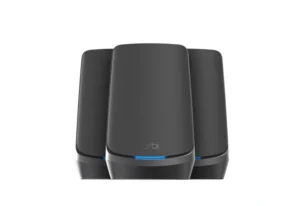
Netgear Orbi 960 (RBKE963)
Wi-Fi 6E (802.11ax) · Quad-band ⭐ (2.4 GHz / 5 GHz-1 / 5 GHz-2 / 6 GHz) · AXE11000 combined speeds · 10 Gbps WAN port ⭐ (router unit) · 2.5 Gbps LAN port (router unit) · 3× Gigabit LAN · Dedicated 5 GHz backhaul ⭐ · 3,000 sq. ft. per node · 9,000 sq. ft. 3-pack total ⭐ · 2.2 GHz quad-core CPU · 1 GB RAM · ~$1,299–$1,500 (3-pack)
⚠️ Important Notes Before Buying
The Netgear Orbi 960 requires a Netgear Armor subscription ($99/year) after the included 30-day trial for continued advanced security features and parental controls. Without Armor, basic security remains but advanced features are locked behind the paywall. The Orbi 960 is quad-band — meaning it has four radio bands per node, using one dedicated 5 GHz band for backhaul. The 10 Gbps WAN port is on the router unit only — satellite nodes use a 2.5 Gbps port. The web interface has a simplified feature set compared to full-featured router interfaces like ASUSWRT — Dong Knows Tech flagged this as a “deliberately neutered web interface” that removes some advanced controls available on other routers. Made for use in the US only.
Best for: Very large homes — 4,000 sq. ft. and above — where no other system on this list provides sufficient coverage without additional nodes. The 3-pack covers up to 9,000 sq. ft., making it the correct choice for large properties, multi-story homes, or small offices where continuous coverage across vast square footage is the primary requirement. Also the right choice for buyers who will have a 10 Gbps internet connection and need a router with a matching WAN port.
The Netgear Orbi 960 (model RBKE963 as a 3-pack) is a quad-band Wi-Fi 6E system — one of the few consumer routers with four separate radio bands per node. The additional 5 GHz band is permanently dedicated to backhaul between nodes, meaning client devices have full access to the 2.4 GHz, primary 5 GHz, and 6 GHz bands without sharing bandwidth with mesh traffic. This dedicated backhaul architecture is the Orbi’s core performance advantage for wireless mesh setups. Popular Science tested it and called it “some of the fastest home internet I have ever experienced — full stop,” specifically praising its coverage and reliability across a large home.
The router unit’s 10 Gbps WAN port is the highest on this list — future-proofing for 10 Gbps internet plans that are becoming available in some markets from 2025 onward. The 2.2 GHz quad-core CPU, 1 GB RAM, and 512 MB NAND flash power each node. Coverage of 3,000 sq. ft. per node means the 3-pack covers 9,000 sq. ft. — more than any other system on this list.
Netgear’s Orbi app is well-reviewed for setup ease; the web interface provides additional controls including VPN configuration and IoT network management. One significant ongoing cost: Netgear Armor at $99/year is required after the trial for the full security feature set — factor this into the total cost of ownership alongside the already premium purchase price.
Backhaul ⭐
Dedicated 5GHz
✓ Pros
- 9,000 sq. ft. 3-pack coverage — most on this list
- 10 Gbps WAN port — ready for multi-gig and future 10 Gbps plans
- Quad-band — dedicated 5 GHz backhaul keeps client bands free
- 3,000 sq. ft. per node — excellent individual node coverage
- Popular Science confirmed fastest real-world wireless speeds tested
- Orbi app is well-reviewed for ease of setup
- 30-day Netgear Armor trial included
- Expandable — add satellite nodes to grow coverage
✗ Cons
- Most expensive on this list — 3-pack ~$1,299–$1,500
- Netgear Armor subscription required ($99/year) for full security
- Simplified/neutered web interface — less advanced control than ASUS
- 10 Gbps WAN only on router unit — satellites use 2.5 Gbps
- Wi-Fi 6E only — no Wi-Fi 7 unlike the eero Pro 7
- Large physical size — 11 × 7.5 × 3.3 inches per unit
- US-only product
💡 ClarityPick Verdict: The Netgear Orbi 960 is the best Wi-Fi router of 2026 for very large homes and properties that need 9,000 sq. ft. of coverage and dedicated backhaul performance. The 10 Gbps WAN port future-proofs for next-gen internet plans. Budget for the $99/year Armor subscription as part of the total cost — at this price point it’s worth including. For homes under 6,000 sq. ft., the ASUS ZenWiFi Pro ET12 or eero Pro 7 deliver equal or better performance per dollar.
Check Current Price on Amazon →
Price changes daily — click to see today’s price
Wi-Fi Router Buyer’s Guide 2026
Choosing between the best Wi-Fi routers 2026 has to offer comes down to five factors: your home size, internet plan speed, ecosystem, budget, and whether you need mesh coverage or a single router will do. Use the guide below to match the right system to your situation.
🎯 Choose eero Pro 7 If…
- You want the latest Wi-Fi 7 standard and genuine future-proofing — as Wi-Fi 7 devices become mainstream over the next 2–3 years, the eero Pro 7’s Multi-Link Operation will deliver meaningful latency and speed improvements that Wi-Fi 6E routers cannot provide
- You have or plan to upgrade to a multi-gigabit fiber plan up to 5 Gbps — the dual 5 GbE ports handle those speeds where Gigabit-only routers cap out
- Simplicity is important — TrueMesh, TrueRoam, and TrueChannel handle network management automatically, making it the lowest-maintenance router on this list
🎯 Choose Google Nest WiFi Pro If…
- You are already deep in the Google ecosystem — Nest cameras, Nest thermostats, Chromecast, Google TV, Google Home app — and want your router to integrate seamlessly with your existing setup without configuration friction
- Ease of setup is your top priority — the Google Home app guided setup is the most beginner-friendly of any system on this list
- Your internet plan is 1 Gbps or under — the Gigabit port ceiling is a non-issue for most current plans
🎯 Choose TP-Link Archer AXE75 If…
- You live in an apartment or home under 2,000 sq. ft. and want Wi-Fi 6E and 6 GHz access at the lowest possible price — the AXE75 delivers the same Wi-Fi 6E standard as much more expensive mesh systems at a fraction of the cost
- Budget is the primary constraint — at under $160 it is the most affordable Wi-Fi 6E router with a 2.5 GbE port available
- You want a single router upgrade from your ISP’s basic hardware without committing to a full mesh ecosystem
🎯 Choose ASUS ZenWiFi Pro ET12 If…
- Maximum Wi-Fi 6E performance is the priority and your home is wired with Ethernet — the ET12’s dual 2.5 GbE ports per node enable wired backhaul that fully unlocks the system’s AXE11000 throughput advantage, and Tom’s Guide confirmed it as the fastest Wi-Fi 6E mesh system tested
- You want lifetime free security without an ongoing subscription — AiProtection Pro is included for life at no additional cost, unlike the Orbi’s Armor subscription
- You need granular network control — the ASUSWRT firmware offers the deepest manual configuration of any system on this list
🎯 Choose Netgear Orbi 960 If…
- Your home exceeds 6,000 sq. ft. and you need to cover it completely with a single mesh system — the 3-pack’s 9,000 sq. ft. coverage is the largest on this list and suitable for large properties or small commercial spaces
- You have or plan to upgrade to a 10 Gbps internet plan — the Orbi 960’s 10 Gbps WAN port is the only one on this list rated for those speeds
- A dedicated wireless backhaul is important for your setup — the quad-band architecture ensures client devices are never sharing bandwidth with node-to-node traffic
📋 Router Buying Checklist 2026
- Match the router to your internet plan speed: If your plan is 1 Gbps or under, any router on this list handles it. If your plan is 1–2.5 Gbps, you need a 2.5 GbE port — the TP-Link AXE75, ASUS ET12, or eero Pro 7 all qualify. If your plan exceeds 2.5 Gbps, the eero Pro 7 (5 GbE) or Orbi 960 (10 Gbps WAN) are the only options on this list that handle those speeds without bottlenecking
- Measure your home before choosing a system: Single router coverage is typically 1,500–2,000 sq. ft. in real-world conditions. For homes up to 4,000 sq. ft., a 2-node mesh suffices. For 4,000–6,000 sq. ft., a 3-node system is recommended. For very large homes above 6,000 sq. ft., the Orbi 960’s 3,000 sq. ft. per node is the correct choice on this list
- Factor in ongoing subscription costs: The eero Pro 7 requires eero Plus ($9.99/month) for advanced security features. The Orbi 960 requires Netgear Armor ($99/year) after the trial. The ASUS ZenWiFi Pro ET12 includes AiProtection Pro free for life. The Google Nest WiFi Pro and TP-Link AXE75 have basic security included free, with optional paid tiers
- Understand the 6 GHz band’s range limitations: The 6 GHz band is the fastest Wi-Fi band available in 2026 but has significantly shorter range than 2.4 GHz or 5 GHz. It works best within 1–2 rooms of the router, without walls between the device and router. In mesh systems, 6 GHz is often used for the high-speed backhaul between nodes. 6 GHz benefits your devices most when your phone, laptop, or gaming system also supports Wi-Fi 6E or Wi-Fi 7
- Check your device compatibility before upgrading: To access Wi-Fi 6E’s 6 GHz band, your device must support Wi-Fi 6E — most flagship smartphones from 2022 onward (iPhone 15 and later, Samsung Galaxy S22 and later, Google Pixel 7 and later) and newer laptops support it. To benefit from Wi-Fi 7’s MLO feature, your device needs Wi-Fi 7 support — most consumer devices in 2026 still use Wi-Fi 6 or 6E. Check your devices before paying a premium for Wi-Fi 7 features your hardware cannot use yet
Frequently Asked Questions
These are the most common questions buyers ask when researching the best Wi-Fi routers 2026 has available — answered with verified specs and real-world testing data.
What is the difference between Wi-Fi 6, Wi-Fi 6E, and Wi-Fi 7?
Wi-Fi 6 (802.11ax) operates on the 2.4 GHz and 5 GHz bands with improvements in multi-device efficiency, OFDMA, and MU-MIMO over Wi-Fi 5. Wi-Fi 6E extends Wi-Fi 6 into the new 6 GHz band — adding seven additional 160 MHz channels with no legacy device interference, lower latency, and more available spectrum for modern devices. Wi-Fi 7 (802.11be) builds further on this with 320 MHz channels (double Wi-Fi 6E’s maximum), Multi-Link Operation (simultaneous transmission across multiple bands), 4K QAM, and significantly higher theoretical throughput. Only the eero Pro 7 on this list uses Wi-Fi 7. All three standards are backward compatible — a Wi-Fi 7 router works with Wi-Fi 6 and older devices; they just don’t benefit from Wi-Fi 7’s advanced features.
Is Wi-Fi 7 worth buying in 2026?
Wi-Fi 7 is worth buying in 2026 if you want to future-proof your network for the next 3–5 years and if you plan to upgrade your devices (phones, laptops, gaming systems) over time. Most devices currently in use — including 2024 and 2025 phones and laptops — support Wi-Fi 6E at best. Wi-Fi 7’s signature feature, Multi-Link Operation, only works when both the router and the connecting device support Wi-Fi 7. If your primary goal is improving speeds today with your current devices, a Wi-Fi 6E system like the ASUS ZenWiFi Pro ET12 delivers equal or better real-world performance for your existing hardware at a lower price. If you think in 3–5 year technology cycles, the eero Pro 7’s Wi-Fi 7 investment makes sense.
Do I need a mesh router or will a single router work?
A single router works well for homes under approximately 1,500–2,000 sq. ft. with a good central placement location and few thick walls between the router and devices. A mesh system becomes beneficial when you have multiple floors, thick walls, dead spots in specific rooms, or a home larger than 2,000 sq. ft. For the TP-Link AXE75 (single router), real-world coverage is confirmed at approximately 2,000 sq. ft. from a central location. If you regularly have devices in rooms where your current router signal is weak, a mesh system will solve the problem more effectively than a faster single router — because signal strength limits speed before the router’s maximum throughput does.
Why does the Google Nest WiFi Pro only have a Gigabit port?
The Google Nest WiFi Pro was designed for simplicity and broad consumer appeal, prioritising ease of use and smart home integration over maximum wired performance. At launch in 2022, most consumer internet plans were 1 Gbps or under — making the Gigabit port sufficient for the majority of users. As multi-gigabit fiber plans become more widely available in 2025 and 2026, the single Gigabit port is an increasingly significant limitation. Google has not released a successor with multi-gig ports as of May 2026. If your internet plan is above 1 Gbps or you plan to upgrade to a faster plan, the eero Pro 7, ASUS ZenWiFi Pro ET12, or Netgear Orbi 960 are the correct choices — all handle multi-gig speeds natively.
What is the best router for smart home devices in 2026?
The best router for smart homes depends on which ecosystem you use. For Google Home users with Nest cameras, thermostats, and Chromecast: the Google Nest WiFi Pro integrates most deeply with Google’s ecosystem via the Google Home app and includes a built-in Thread border router. For Amazon Alexa and Echo users: the eero Pro 7 includes Thread, Zigbee, and Matter hub capability and integrates directly with Alexa for voice control. For Apple HomeKit users: the eero Pro 7 and ASUS ZenWiFi Pro ET12 both support Matter, which bridges Apple HomeKit with other smart home ecosystems. All five routers on this list support WPA3 security — important for protecting the large number of IoT devices in a connected home, many of which lack their own strong security.
🏆 Final Verdict — 5 Best Wi-Fi Routers 2026
These are the best Wi-Fi routers 2026 has to offer — five systems for five different priorities. Match the router to your home size, internet plan speed, ecosystem, and budget.
Best Overall (Wi-Fi 7): eero Pro 7 — Wi-Fi 7, MLO, dual 5 GbE, Matter/Thread/Zigbee hub, 3-year warranty
~$300/node
Best Smart Home: Google Nest WiFi Pro — easiest setup, Google Home integration, Thread, Wi-Fi 6E
~$199–$299/node
Best Value: TP-Link Archer AXE75 — Wi-Fi 6E tri-band, 2.5 GbE port, 6 GHz access at the lowest price
~$115–$160
Best Performance Mesh: ASUS ZenWiFi Pro ET12 — AXE11000, dual 2.5 GbE/node, fastest tested, lifetime AiProtection
~$430–$800
Best Large Home: Netgear Orbi 960 — 9,000 sq. ft. 3-pack, 10 Gbps WAN, quad-band dedicated backhaul
~$1,299–$1,500
Affiliate Disclosure: As an Amazon Associate, we earn from qualifying purchases. This review contains affiliate links at no extra cost to you. Our recommendations are always independent and unbiased. Last Updated: May 2026