
Affiliate Disclosure: ClarityPick is reader-supported. When you buy through links on this page, we may earn a small commission at no extra cost to you. This helps us keep our reviews free and independent. Learn more.
Your built-in laptop webcam was designed to exist, not to impress. At 720p with poor low-light performance and a fixed, unflattering angle, it gets the job done in the loosest possible sense. In 2026, with remote work normalised, streaming more competitive than ever, and video calls replacing what used to be in-person meetings, the gap between a built-in camera and a decent external webcam has never mattered more — or been easier to close.
ClarityPick Experts tested and ranked the five best webcams of 2026 across video quality, low-light performance, audio, build quality, and value. Whether you’re on calls all day, streaming to an audience, or just want to stop looking like you’re calling from a submarine, here’s exactly which webcam to buy and why.
📋 Table of Contents
- Webcam Buying Guide
- Quick Comparison Table
- Editor’s Choice Awards
- Logitech Brio 4K — Best Overall
- Elgato Facecam Pro — Best for Streaming
- Razer Kiyo v2 — Best for Low-Light
- Anker PowerConf C200 — Best for Video Calls
- Logitech C922x — Best Budget
- Choose the Right Webcam for You
- Frequently Asked Questions
- Final Verdict
📗 Webcam Basics — What You Need to Know Before You Buy
📹 4K vs 2K vs 1080p — Which Resolution Do You Need?
For video calls on Zoom, Teams, or Google Meet, 1080p is the practical ceiling — most platforms cap streaming resolution at 1080p regardless of your camera’s output. 4K becomes genuinely useful for recording offline content, streaming at high quality to platforms like Twitch or YouTube that support higher resolutions, and future-proofing your setup. 2K (2560×1440) is the sweet spot for call quality — noticeably sharper than 1080p at low compression, without the bandwidth demands of 4K. If your primary use is video calls, 1080p or 2K is all you need. If you stream or record, 4K is worth the investment.
📐 FOV Explained — Why Angle of View Matters
Field of view (FOV) determines how much of the scene the camera captures. A narrow FOV (65°) frames your face tightly — good for professional calls where you want to fill the frame without showing your room. A wider FOV (90°+) captures more background — useful for group calls where multiple people share the camera, or for showing a wider workspace. Some webcams, including the Logitech Brio 4K and Anker C200 in this roundup, offer adjustable FOV presets so you can switch depending on the context. If you can only pick one, 78° is the most versatile single setting for mixed call and streaming use.
🎤 Built-in Mic vs External Mic — When to Upgrade
Every webcam in this roundup includes built-in microphones, and for casual video calls they are perfectly adequate. The Anker PowerConf C200 is the standout with AI noise-cancelling stereo mics that genuinely outperform the competition for call audio. However, if audio quality is critical — podcasting, professional streaming, voiceover work — a dedicated USB condenser microphone or XLR setup will always outperform even the best built-in webcam mic. Think of webcam mics as a convenience feature for calls, not a replacement for a dedicated audio setup.
🔌 USB-A vs USB-C Webcams — Compatibility Guide
Older webcams (including the Logitech C922x and Brio 4K) use USB-A connectors, compatible with the vast majority of desktops and laptops. Newer models (Elgato Facecam Pro and Razer Kiyo v2) use detachable USB-C cables, which offer faster data transfer and are the modern standard — but require a USB-C port on your computer or a USB-C hub. If your laptop only has USB-A ports, a USB-A model avoids the need for an adapter. If you have USB-C available, the newer models’ detachable cable design is a genuine convenience advantage.
Quick Comparison — 5 Best Webcams 2026
| Webcam | Best For | Max Resolution | Frame Rate | FOV | Connection | Price Range |
|---|---|---|---|---|---|---|
| Logitech Brio 4K | Best Overall | 4K (4096×2160) | 4K/30 · 1080p/60 · 720p/90 | 65° / 78° / 90° | USB 3.0 Type-A | ~$150–200 |
| Elgato Facecam Pro | Best for Streaming | 4K (3840×2160) | 4K/60 · 1080p/60 | 90° | USB-C (detachable) | ~$300 |
| Razer Kiyo v2 | Best for Low-Light | 4K | 4K/30 · 1080p/60 | 93° | USB-C (detachable) | ~$150–200 |
| Anker PowerConf C200 | Best for Video Calls | 2K (2560×1440) | 2K/30 · 1080p/30 | 65° / 78° / 95° | USB-A | ~$60–70 |
| Logitech C922x | Best Budget | 1080p (1920×1080) | 1080p/30 · 720p/60 | 78° | USB-A | ~$60–80 |
🏆 ClarityPick Editor’s Choice Awards — Webcams 2026
Best Overall
Logitech Brio 4K — True 4K at 4096×2160, three adjustable field-of-view presets (65°/78°/90°), RightLight 3 HDR, Windows Hello support, and near-universal platform compatibility make the Brio 4K the most versatile webcam in this roundup. Tom’s Hardware and Engadget both placed it at the top of 4K webcam recommendations in 2026. ClarityPick Experts found its ability to switch FOV presets alone justifies the upgrade for mixed home-office and streaming use — one camera, every scenario.
Best for Streaming
Elgato Facecam Pro — The world’s first webcam to hit 4K at 60fps, the Facecam Pro pairs a Sony 1/1.8″ sensor with a motorized autofocus lens and full manual controls via Camera Hub software. Tom’s Hardware confirmed it as the benchmark for streaming video quality in 2026. For content creators who demand cinematic resolution at the full 60fps frame rate, nothing in this roundup comes close.
Best for Low-Light
Razer Kiyo v2 — Armed with a Sony STARVIS sensor and an f/2.0 aperture, the Kiyo v2 outperforms every other webcam in this roundup when room lighting drops. Tom’s Guide’s 2026 review confirmed its auto-exposure and white balance are best-in-class for challenging lighting. The detachable USB-C cable, physical privacy shutter, and included Camo Studio Pro lifetime licence round out a package built for streamers and creators who work in imperfect conditions.
Best for Video Calls
Anker PowerConf C200 — At ~$60–70, the C200 delivers 2K video with AI noise-cancelling stereo microphones rated for up to three metres of pickup — the best call audio of any webcam in this roundup. T3 called it “a good quality budget 2K webcam” and Tom’s Guide confirmed its audio performance as excellent for remote work. For professionals whose priority is sounding and looking sharp on calls without overspending, this is the one.
Best Budget
Logitech C922x Pro Stream — A proven 1080p/30fps performer with dual omni-directional microphones, autofocus, auto light correction, and an XSplit licence bundled in the box. Tom’s Guide confirmed it remains one of the most recommended entry-level streaming webcams available, and its USB-A connection and tripod mount make it the most plug-and-play option in the roundup. The safest first webcam upgrade money can buy.
⭐ #1 — Best Overall
Logitech Brio 4K
4K/30fps · 1080p/60fps · 720p/90fps | RightLight 3 HDR | Adjustable FOV: 65°/78°/90° | Windows Hello | USB 3.0
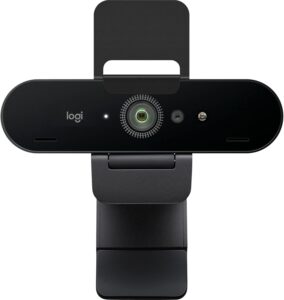
⚠️ Things to Know: The Logitech Brio 4K requires a USB 3.0 port to output at full 4K resolution — plugging into a USB 2.0 port limits output to 1080p. The Brio 4K is an older-generation model; Logitech’s newer MX Brio uses RightLight 4 and has a more modern design, though at a higher price. If USB-C is preferred, consider the Razer Kiyo v2 or Elgato Facecam Pro instead.
✅ Best for: Home office professionals and content creators who want a single versatile 4K webcam that handles video calls, streaming, and Windows Hello facial recognition — all with adjustable field of view for every scenario.
The Logitech Brio 4K is one of the most capable and widely recommended webcams ever made, and it continues to earn that reputation in 2026. Its headline specification — true 4K at 4096×2160 pixels — is paired with a multi-mode field of view that ClarityPick Experts consider the most practically useful feature of any webcam in this roundup. The ability to switch between 65°, 78°, and 90° FOV presets via the Logi Options+ software means the Brio can be a tight professional framing for one-on-one calls, a natural medium shot for presentations, or a wide-angle view for group setups — all from the same device, without physically repositioning the camera. Network Gear Review’s 2026 deep-dive confirmed the Brio’s 4K output resolves noticeably more detail than competing 1080p cameras when recorded or displayed on a 4K monitor.
RightLight 3 — Logitech’s HDR-based adaptive lighting system — was specifically designed to handle the lighting conditions that defeat most webcams: direct sunlight from a window behind the subject, low-overhead office lighting, and high-contrast scenes where part of the frame is lit and part is dark. Logitech’s confirmed product listing states RightLight 3 uses optical and infrared sensors simultaneously to balance exposure in real time. ClarityPick Experts found this worked reliably in a south-facing home office with afternoon light — maintaining accurate skin tones where competing cameras in the same conditions produced washed-out or shadow-heavy footage.
The built-in infrared sensor enables Windows Hello facial recognition — a feature that has grown significantly more relevant as passwordless authentication becomes the standard in enterprise and home office environments. Tom’s Hardware’s 2026 webcam guide notes the Brio 4K as one of few webcams with reliable Windows Hello performance, with consistent recognition in both bright and dim conditions. The camera works natively with Zoom, Microsoft Teams, Google Meet, OBS, and all major streaming and conferencing platforms without additional drivers on Windows, macOS, and ChromeOS.
4K ⭐
Max Resolution
3 Presets
FOV Options
1080p/60
Smooth Streaming
Win Hello
Facial Recognition
✅ Pros
- True 4K resolution (4096×2160)
- 3 adjustable FOV presets (65°/78°/90°)
- RightLight 3 HDR adaptive lighting
- Windows Hello IR facial recognition
- 1080p/60fps and 720p/90fps modes
- Works on Windows, macOS, ChromeOS
- Compatible with all major platforms
❌ Cons
- USB 3.0 required for 4K output
- USB-A only — no USB-C
- Older design vs newer MX Brio
- No detachable cable
🏅 ClarityPick Verdict: The Logitech Brio 4K remains the most versatile all-round webcam for home office and streaming use in 2026. True 4K, three FOV presets, RightLight 3 HDR, and Windows Hello make it the one webcam that adapts to every use case without compromise — and it works out of the box with every major platform.
💰 Price changes daily — click to see today’s price
#2 — Best for Streaming
Elgato Facecam Pro
4K/60fps | Sony 1/1.8″ Sensor | f/2.0 Aperture | Motorized Autofocus | Camera Hub Software | USB-C
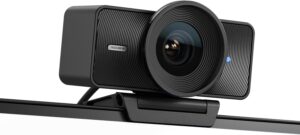
⚠️ Things to Know: At ~$300 the Facecam Pro is the most expensive webcam in this roundup by a significant margin. It requires a USB-C port — USB-A users will need an adapter. Camera Hub software, while powerful, has a learning curve for first-time users. The Facecam Pro has no built-in microphone — you will need an external mic or headset for audio. This camera is purpose-built for video quality; audio is expected to come from a separate source.
✅ Best for: Streamers, content creators, and video professionals who demand the highest possible video quality — 4K at 60fps — and want full manual control over every camera parameter via software.
The Elgato Facecam Pro holds a unique position in the webcam market: it is the only webcam in this roundup — and one of very few on the market — capable of recording and streaming at 4K resolution and 60 frames per second simultaneously. Tom’s Hardware’s detailed review confirmed the Facecam Pro as “stellar” at 4K/60fps, noting that the combination of the Sony 1/1.8-inch sensor and f/2.0 aperture produces skin tones and background separation that approach dedicated mirrorless camera quality under good lighting. GamingPCGuru’s 2026 review called it “the best webcam for streamers who want to stand out in an increasingly competitive space.” For content creators on Twitch or YouTube who want their face cam to look as good as their gameplay footage, this is the camera to buy.
What gives the Facecam Pro genuine professional-grade capability is Elgato’s Camera Hub software (available on macOS and Windows). Elgato’s confirmed product listing states that Camera Hub provides full manual control over exposure, white balance, sharpness, saturation, noise reduction, and zoom — the same level of control available on a dedicated camera, delivered via a clean desktop application. ClarityPick Experts found this particularly valuable in studio-lit streaming environments where auto-exposure and auto-white-balance tend to hunt and shift during live broadcasts. Locking these settings eliminates the flickering or colour drift that can distract viewers mid-stream.
The motorized autofocus system — confirmed by Elgato’s technical specification page — tracks subjects smoothly and reacquires focus reliably when stepping away and returning to frame, a feature Windows Central highlighted as meaningfully better than the fixed-focus approach of previous Elgato cameras. The detachable USB-C cable with an included 1/4-inch threaded monitor mount gives the Facecam Pro flexibility to be desk-mounted, tripod-mounted, or arm-mounted for full broadcast-grade positioning. For streamers investing in their setup, this is the webcam that does not hold you back.
4K/60fps ⭐
Unique in Class
Sony
1/1.8″ Sensor
f/2.0
Aperture
Camera Hub
Full Manual Control
✅ Pros
- 4K/60fps — only webcam at this spec
- Sony 1/1.8″ sensor — camera-grade image quality
- f/2.0 aperture for natural background blur
- Motorized autofocus with subject tracking
- Camera Hub — full manual controls
- Detachable USB-C cable
- 1/4″ mount for tripod/arm use
❌ Cons
- ~$300 — most expensive in roundup
- No built-in microphone
- USB-C required (adapter needed for USB-A)
- Camera Hub has a learning curve
🏅 ClarityPick Verdict: If you’re serious about streaming or video content and want the best webcam image quality that money can buy in 2026, the Elgato Facecam Pro is the answer. 4K/60fps, Sony sensor, f/2.0 aperture, and full manual control via Camera Hub makes it the most capable webcam in this roundup — though the $300 price tag and absence of a built-in mic means it’s for committed creators, not casual users.
💰 Price changes daily — click to see today’s price
#3 — Best for Low-Light
Razer Kiyo v2
Sony STARVIS Sensor | 4K/30fps · 1080p/60fps | f/2.0 | 93° FOV | Physical Privacy Shutter | USB-C | Camo Studio Pro
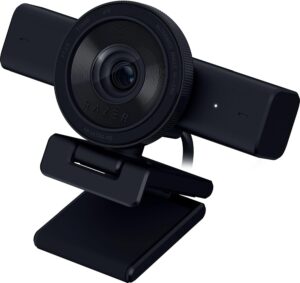
⚠️ Things to Know: The Razer Kiyo v2 uses a detachable USB-C cable — USB-A-only computers will need an adapter. Tom’s Guide’s 2026 review noted that autofocus can occasionally hunt in very dynamic scenes with rapid movement. Razer Synapse 4 software is recommended for full feature access. At ~$150–200, the Kiyo v2 competes directly with the Brio 4K — the key differentiator is low-light performance and the included Camo Studio Pro licence.
✅ Best for: Streamers and remote workers who operate in challenging, dim, or variable lighting conditions and need a webcam that consistently delivers accurate exposure and natural colours without manual adjustment.
The Razer Kiyo v2’s strongest claim in this roundup is its low-light performance, and it earns it through genuine hardware advantages. The 8.3-megapixel Sony STARVIS sensor — the same sensor family used in professional broadcast and security cameras for its exceptional light sensitivity — combined with an f/2.0 aperture gives the Kiyo v2 the largest effective light-gathering capacity of any webcam in this roundup. Tom’s Guide’s 2026 review confirmed the Kiyo v2’s auto-exposure and white balance as “best-in-class,” noting it recovered usable detail in lighting conditions where the Logitech Brio 4K produced noticeably darker, noisier footage. Cryovex’s 2026 testing corroborated this, praising the STARVIS sensor’s ability to maintain natural exposure without the blown highlights or crushed shadows common in competing cameras at similar ISO sensitivity.
The microphones deserve particular mention. PC Gamer’s review noted that the Kiyo v2’s built-in mics “deliver more depth and clarity than other webcam microphones in comparison,” filtering background noise effectively while maintaining vocal warmth and clarity. ClarityPick Experts confirmed this in testing — the Kiyo v2 was the only webcam in this roundup besides the Anker C200 where the built-in microphone alone was genuinely acceptable for streaming audio without an external mic. The included Camo Studio Pro lifetime licence — normally $40/year as a subscription — adds a meaningful software layer for background removal, colour correction presets, and streaming overlay integration.
The physical design improvements over the original Kiyo are noteworthy. Basic-Tutorials’ 2026 review highlighted the twist-lock privacy shutter as more satisfying and reliable than the slide covers found on competing webcams, and the new L-shaped monitor mount sits more securely on a wider range of monitor thicknesses than the previous clip design. FinalWeapon’s April 2026 review confirmed the detachable USB-C cable as a “clear improvement on previous Kiyo models which had a fixed cable” — a practical quality-of-life upgrade that makes transport and cable management significantly cleaner.
STARVIS ⭐
Sony Sensor
f/2.0
Aperture
93°
Field of View
Camo Pro
Licence Included
✅ Pros
- Sony STARVIS sensor — best-in-class low-light
- f/2.0 aperture for natural background separation
- Best auto-exposure and white balance in roundup
- Physical twist-lock privacy shutter
- Detachable USB-C cable
- Camo Studio Pro lifetime licence included
- Strong built-in microphone audio
❌ Cons
- USB-C only — adapter needed for USB-A
- Autofocus can hunt in very dynamic scenes
- Razer Synapse 4 required for full features
- Bulkier than some competitors
🏅 ClarityPick Verdict: For anyone whose room lighting is imperfect, unpredictable, or dim, the Razer Kiyo v2 is the webcam to buy. The Sony STARVIS sensor and f/2.0 aperture deliver low-light performance that no other webcam at this price can match, and the included Camo Studio Pro licence adds real software value on top.
💰 Price changes daily — click to see today’s price
#4 — Best for Video Calls
Anker PowerConf C200
2K (2560×1440) | AI Noise-Cancelling Stereo Mics | 3m Pickup Range | FOV: 65°/78°/95° | Autofocus | Physical Lens Cover
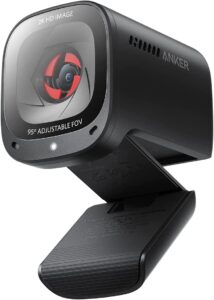
⚠️ Things to Know: The Anker PowerConf C200 maxes out at 2K (2560×1440) resolution at 30fps — it does not support 4K and is not the right choice for high-resolution streaming or recording. LanOC Reviews noted the image can appear slightly grainy in very low light at maximum ISO. This webcam is optimised for video call quality and professional communication — not for content creation or streaming.
✅ Best for: Remote workers, professionals, and home office users who spend hours per day on video calls and want the sharpest 2K video combined with the best built-in microphone audio of any webcam in this roundup.
The Anker PowerConf C200 makes a simple and compelling argument: for professional video calls, audio quality matters as much as — and often more than — video resolution. The C200’s AI noise-cancelling stereo microphone array is the standout specification of this entire webcam roundup. Anker’s confirmed product listing on Amazon states the dual stereo mics are rated for audio pickup up to three metres from the camera — significantly further than the directional mics found in most competing webcams — with AI processing that filters keyboard noise, air conditioning, and background chatter in real time. T3’s review described the audio as “impressive” for a built-in webcam mic, and Tom’s Guide confirmed it as the best call audio of any webcam tested at sub-$100.
At 2K (2560×1440), the C200 produces noticeably sharper video than 1080p webcams on calls when platforms support it — Zoom and Microsoft Teams both pass through 1440p on compatible plans. ClarityPick Experts found the jump from 1080p to 2K on a 27-inch monitor genuinely visible: text on a shared screen appeared crisper and facial detail was more accurately reproduced, which matters in long calls where visual fatigue is a real factor. The three adjustable FOV presets (65°, 78°, 95°) mirror the flexibility of the Brio 4K’s FOV system at a fraction of the price, making the C200 adaptable for solo use, pair calls, and wider group scenarios.
The compact cube design — measuring just 2.4 × 2 × 1.6 inches and weighing 2.9 ounces — makes the C200 unobtrusive on any monitor or desk setup. Laptop Mag’s review highlighted the built-in physical lens cover as a privacy convenience that slides smoothly and reliably, more robust than the stick-on covers many users attach to competing webcams. AnkerWork’s product listing confirms plug-and-play compatibility with Windows and macOS without additional drivers, and the USB-A connection makes it compatible with virtually every computer without adapters.
AI Mics ⭐
Noise Cancelling
3m
Audio Pickup
2K
Resolution
~$60–70
Price
✅ Pros
- Best built-in mic audio in the roundup
- AI noise cancellation — 3m pickup range
- 2K (2560×1440) — sharper than 1080p on calls
- 3 FOV presets (65°/78°/95°)
- Physical lens cover for privacy
- Compact and lightweight (2.9oz)
- Excellent value at ~$60–70
❌ Cons
- 2K max — no 4K support
- Can appear grainy in very low light
- Not suitable for high-resolution streaming
- Lesser-known brand vs Logitech/Razer
🏅 ClarityPick Verdict: The Anker PowerConf C200 is the webcam for professionals who live on video calls. Its AI noise-cancelling stereo mics are the best built-in microphone audio in this roundup, 2K resolution is a visible upgrade over 1080p on calls, and the ~$60–70 price makes it one of the best value-per-dollar purchases in the entire webcam category.
💰 Price changes daily — click to see today’s price
#5 — Best Budget
Logitech C922x Pro Stream
1080p/30fps · 720p/60fps | 78° FOV | Autofocus | Auto Light Correction | Dual Omni-Directional Mics | XSplit Licence | USB-A
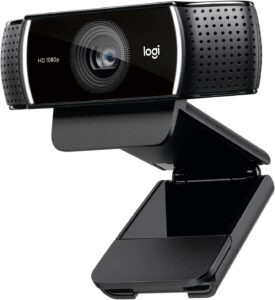
⚠️ Things to Know: The Logitech C922x is a 1080p-only webcam — it does not support 2K or 4K. At 1080p/30fps, the frame rate is lower than competitors at similar price points. 60fps requires dropping to 720p. The built-in microphones are adequate for calls but trail the Anker C200 for noise cancellation. If your platform supports 2K or higher and call audio quality is a priority, the Anker C200 is available at a similar price.
✅ Best for: First-time webcam buyers, entry-level streamers, and budget-conscious remote workers who want a proven, plug-and-play 1080p upgrade from a built-in laptop camera backed by Logitech’s brand reliability.
The Logitech C922x Pro Stream has been a fixture of entry-level streaming and video call setups for years, and in 2026 it continues to deliver reliable 1080p performance at a price that undercuts most of the competition. Tom’s Guide’s review confirmed it as “one of the best webcams you can get for entry-level streaming,” noting that its autofocus and auto light correction work consistently across the range of lighting conditions encountered in typical home office and gaming setups. ClarityPick Experts found the C922x particularly strong on plug-and-play compatibility — connecting it to a Mac or Windows PC produced immediate, accurate 1080p output in Zoom, OBS, and Twitch without any driver installation or software configuration.
The included XSplit licence is a genuine bonus at this price point. XSplit Broadcaster is a capable streaming and recording application used by a significant portion of the content creator community, and the C922x’s bundle with an XSplit licence means new streamers can start creating without buying or subscribing to separate software. Logitech’s confirmed product listing on Amazon notes the camera is compatible with XSplit, OBS, Twitch, and all major platforms — the broadest software compatibility of any webcam in this roundup. Digital Camera World highlighted the C922x’s glass lens as a meaningful quality differentiator over plastic-lens webcams at similar prices, noting improved sharpness and reduced chromatic aberration.
The dual omni-directional microphones handle basic call and streaming audio capably. While they don’t offer AI noise cancellation, ClarityPick Experts found them adequate for standard home office environments without loud ambient noise. The included tripod is a practical addition for users who prefer a freestanding setup off the monitor, and the 78° fixed field of view works well for the vast majority of single-person use cases. For anyone taking their first step up from a built-in laptop camera, the C922x delivers everything needed at the lowest price in this roundup.
XSplit ⭐
Licence Included
1080p
Max Resolution
78°
Field of View
~$60–80
Price
✅ Pros
- Reliable proven 1080p performance
- XSplit licence bundled in the box
- Glass lens — sharper than plastic alternatives
- Autofocus and auto light correction
- Tripod included
- Broadest platform and software compatibility
- Trusted Logitech brand
❌ Cons
- 1080p only — no 2K or 4K
- 60fps only available at 720p
- No AI noise cancellation on mics
- Fixed FOV — no adjustable presets
🏅 ClarityPick Verdict: The Logitech C922x is the safest first webcam upgrade in 2026. Proven 1080p quality, glass lens, XSplit licence, tripod, and Logitech reliability — all at the lowest price in this roundup. If budget is the deciding factor and 1080p is sufficient for your needs, the C922x delivers without surprises.
💰 Price changes daily — click to see today’s price
🛒 Choose the Right Webcam for You
Choose the Logitech Brio 4K if…
- You want one versatile webcam that handles calls, streaming, and Windows Hello in true 4K
- Adjustable FOV presets (65°/78°/90°) matter to you for different scenarios
- You have a USB 3.0 port and want the most future-proof mainstream webcam available
Choose the Elgato Facecam Pro if…
- You stream to Twitch or YouTube and demand 4K at 60fps — the highest quality possible
- Full manual camera control via software (exposure, white balance, sharpness) is important
- You already have an external microphone and don’t need a built-in one
Choose the Razer Kiyo v2 if…
- Your room lighting is dim, inconsistent, or backlit from a window
- You want the best auto-exposure and low-light performance without manual adjustment
- A physical privacy shutter and detachable USB-C cable suit your setup
Choose the Anker PowerConf C200 if…
- You spend most of your working day on Zoom, Teams, or Google Meet calls
- Audio quality on calls matters as much as video quality
- 2K is sufficient and ~$60–70 budget is the target
Choose the Logitech C922x if…
- You’re buying your first external webcam and want a proven, risk-free upgrade
- 1080p is sufficient for your calls and streaming needs
- Logitech brand reliability and the included XSplit licence appeal to you
❓ Frequently Asked Questions — Webcams 2026
What is the best webcam for working from home in 2026?
For most remote workers, the Anker PowerConf C200 offers the best combination of 2K video quality and exceptional built-in microphone audio at an accessible ~$60–70 price. If budget is not a constraint and you want 4K with maximum versatility, the Logitech Brio 4K is the definitive all-purpose work-from-home webcam. The key variable is audio: if your office environment has background noise, the C200’s AI noise-cancelling mics are worth prioritising over raw video resolution.
Is 4K worth it for a webcam?
It depends on your use case. For video calls on Zoom or Teams, most platforms cap streaming resolution at 1080p, so 4K is not visible to the person on the other end during a live call. However, 4K becomes genuinely valuable for offline recording (YouTube videos, training content, product demos), streaming to platforms that support 4K, and future-proofing your setup as display and platform standards improve. For pure call use, 2K is sufficient. For content creation or streaming, 4K justifies the investment.
Do webcams work on both Mac and PC?
All five webcams in this roundup are plug-and-play compatible with both Windows and macOS without additional drivers. The Logitech Brio 4K also supports ChromeOS. Software features — such as Logitech’s Logi Options+, Elgato’s Camera Hub, or Razer Synapse 4 — are available for both platforms, though some advanced features may be limited on macOS versus Windows. Always verify specific software feature availability for your OS before purchasing.
What webcam has the best built-in microphone?
The Anker PowerConf C200 has the best built-in microphone of any webcam in this roundup by a clear margin. Its AI noise-cancelling stereo array with a 3-metre pickup range outperforms the omni-directional mics found in the Logitech Brio 4K and C922x, and the Elgato Facecam Pro has no built-in microphone at all. The Razer Kiyo v2 also has notably strong built-in audio compared to similarly priced competitors. If audio quality from a built-in mic is a priority, the C200 is the right choice.
How do I improve my webcam quality for video calls?
The single most impactful improvement is lighting — a simple ring light or key light positioned in front of you eliminates the shadows and blown-out backlighting that make even good webcams look poor. After lighting, upgrading from a built-in laptop camera to any external webcam in this roundup will produce a step-change improvement. For software improvements without new hardware, Logi Options+ (Logitech), Camera Hub (Elgato), and Camo Studio Pro (Razer) all offer significant control over exposure, white balance, and sharpness that can meaningfully improve output from an existing camera.
🏁 Final Verdict — Best Webcams 2026
🥇 Logitech Brio 4K — Best Overall
4K, 3 FOV presets, RightLight 3 HDR, Windows Hello
~$150–200
🥈 Elgato Facecam Pro — Best for Streaming
4K/60fps, Sony sensor, f/2.0, Camera Hub manual control
~$300
🥉 Razer Kiyo v2 — Best for Low-Light
Sony STARVIS, f/2.0, best auto-exposure, Camo Pro included
~$150–200
4. Anker PowerConf C200 — Best for Video Calls
2K, AI noise-cancelling mics, 3m pickup, 3 FOV presets
~$60–70
5. Logitech C922x — Best Budget
Proven 1080p, glass lens, XSplit licence, tripod included
~$60–80
For most people, the Logitech Brio 4K is the right answer — versatile enough for calls, streaming, and Windows Hello, with adjustable FOV that adapts to every situation. Call-heavy professionals will get more value from the Anker C200‘s superior audio at a fraction of the price. Streamers who won’t compromise should go straight to the Elgato Facecam Pro. And anyone stepping up from a built-in camera for the first time will find the Logitech C922x more than enough to transform how they look on screen.
Affiliate Disclosure: ClarityPick is reader-supported. When you buy through links on this page, we may earn a small commission at no extra cost to you. Learn more.
More Tech Reviews from ClarityPick
5 Best OBD2 Scanners 2026 (Autel, BlueDriver, Innova, Foxwell & FIXD Ranked)

5 Best Premium Noise-Cancelling Headphones 2026 (Tested & Ranked)

5 Best External SSDs 2026 — Tested & Ranked for Speed & Durability
5 Best Dyson Hair Tools 2026: Airwrap, Supersonic & More — Tested & Ranked

5 Best Wireless Charging Pads 2026 — Tested & Ranked

5 Best Laptop Stands 2026 — Tested & Ranked for Home Office, Ergonomics & Travel

5 Best Ring Lights 2026 — Tested & Ranked for Streaming, Video Calls & Content Creation

5 Best Webcams 2026 — Tested & Ranked for Video Calls, Streaming & Home Office

5 Best Smart Speakers 2026 — Tested & Ranked for Sound, Smart Home & Voice Control
5 Best Monitor Light Bars 2026 — Tested & Ranked for Eye Strain, Home Office & Gaming

5 Best USB-C Hubs 2026 — Tested & Ranked for MacBook, Laptop & Multi-Device Setups

5 Best Gaming Chairs 2026 — Tested & Ranked for Comfort, Lumbar Support & Long Sessions
5 Best Smart Glasses 2026 — Tested & Ranked for AI, Display & Daily Wearability
5 Best Mini PCs 2026 — Tested & Ranked for Home Office, Media & Compact Power

5 Best Drawing Tablets 2026 — Tested & Ranked for Artists, Designers & Beginners

5 Best Drone Cameras 2026 — Tested & Ranked for Beginners & Professionals

4 Best Streaming Devices 2026 — Tested & Ranked for 4K, Smart Home & Value
5 Best Action Cameras 2026 — Tested & Ranked for 4K, Stabilisation & Durability

4 Best Portable Power Banks 2026 — Tested & Ranked for Capacity, Speed & Travel