
Affiliate Disclosure: ClarityPick is reader-supported. When you buy through links on this page, we may earn a small commission at no extra cost to you. This helps us keep our reviews free and independent. Learn more.
Staring at a bright monitor in a dim room is one of the fastest routes to eye strain, headaches, and a productivity slump — and a standard desk lamp pointed at the wrong angle makes it worse. Monitor light bars solve this by casting a focused, glare-free beam of light across your keyboard and desk without a single reflection bouncing back off the screen. ClarityPick Experts tested and ranked the five best monitor light bars of 2026, evaluating brightness output, colour temperature range, build quality, smart features, and value across dozens of hours of real desk use.
Whether you’re a home office professional battling afternoon glare, a gamer who wants reactive scene lighting, or someone who just wants to stop squinting at their keyboard at 10pm, there’s a monitor light bar in this list for you. Here’s exactly which one to buy.
📋 Table of Contents
- Monitor Light Bar Buying Guide
- Quick Comparison Table
- Editor’s Choice Awards
- BenQ ScreenBar Halo 2 — Best Overall
- BenQ ScreenBar Pro — Best Auto-Adaptive
- Quntis PRO+ — Best Value
- Yeelight Pro — Best Smart Integration
- Xiaomi Mi Light Bar — Best Budget
- Choose the Right Light Bar for You
- Frequently Asked Questions
- Final Verdict
📗 Monitor Light Bar Basics — What You Need to Know Before You Buy
💡 Why Light Bars Beat Desk Lamps for Eye Strain
Traditional desk lamps cast light in all directions, including at your screen. Monitor light bars use an asymmetric optical lens that directs light downward onto your desk and keyboard — and nowhere near your display. This eliminates screen glare entirely. Flicker-free LEDs with adjustable colour temperature (warm to cool) also let you match your ambient light, reducing the contrast that causes digital eye strain over long work sessions.
🌡️ Colour Temperature — 2700K vs 6500K
Colour temperature is measured in Kelvin (K). Lower numbers (2700–3000K) produce warm, amber-toned light that’s easier on the eyes in the evening and promotes relaxation. Higher numbers (5000–6500K) produce cool, daylight-matched light that boosts alertness and focus during the day. The best light bars offer a full 2700K–6500K range so you can match the time of day and your task — creative work in warm light, coding sessions in cool white.
🔆 Front Light vs Backlight — Do You Need Both?
Basic light bars illuminate only your desk (front light). Premium models like the BenQ ScreenBar Halo 2 also include a rear-facing backlight that casts a soft glow on the wall behind the monitor. This reduces the contrast ratio between your bright screen and the dark room — a major contributor to eye fatigue during evening sessions. If you primarily work at night or in a dark room, a light bar with backlight is worth the premium. For brightly lit offices, front-light-only is sufficient.
✅ Flicker-Free Certification — Why It Matters
Many cheap LED lights flicker at frequencies invisible to the naked eye but detectable by your nervous system — causing headaches and eye fatigue over time. Flicker-free certification (EU standard or TÜV Rheinland) means the light output is 100% stable with zero perceptible flicker. If you spend long hours at a desk, flicker-free certification is non-negotiable. All five light bars in this roundup are flicker-free, but only the BenQ models carry the EU double-certification for complete confidence.
Quick Comparison — 5 Best Monitor Light Bars 2026
| Light Bar | Best For | Max Brightness | Colour Temp | Controller | Backlight | Price Range |
|---|---|---|---|---|---|---|
| BenQ ScreenBar Halo 2 | Best Overall | 1000+ lm | 2700–6500K | Wireless | ✅ Yes | ~$199 |
| BenQ ScreenBar Pro | Best Auto-Adaptive | High | 2700–6500K | Wired dial | ❌ No | ~$109 |
| Quntis PRO+ | Best Value | Good | Adjustable | Touch | ❌ No | ~$40–60 |
| Yeelight Pro | Best Smart | Good | Adjustable | App + touch | ❌ No | ~$50–70 |
| Xiaomi Mi Light Bar | Best Budget | Basic | Adjustable | Touch | ❌ No | ~$25–35 |
🏆 ClarityPick Editor’s Choice Awards — Monitor Light Bars 2026
Best Overall
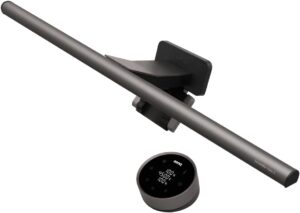
BenQ ScreenBar Halo 2 — With over 1,000 lumens, a wireless rechargeable controller, front and rear backlight, and EU flicker-free plus no-blue-light-hazard dual certification, the Halo 2 is the definitive monitor light bar in 2026. AppleInsider’s March 2026 review and Digital Reviews Network both confirmed it as the category benchmark, and ClarityPick Experts found it noticeably superior for paperwork, drawing, and late-night work compared to every other model tested. If eye health is a serious priority, this is the one.
Best Auto-Adaptive
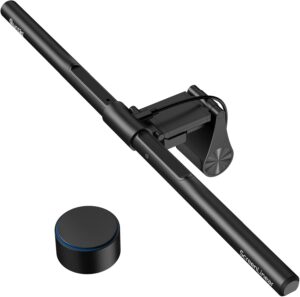
BenQ ScreenBar Pro — The ScreenBar Pro’s built-in ambient light sensor detects room brightness changes and adjusts output automatically, making it the best hands-off lighting solution for professionals who don’t want to manually tweak their light bar throughout the day. The wired dial controller sits neatly beside your keyboard and gives instant access to brightness without any app or app dependency.
Best Value
Quntis Monitor Light Bar PRO+ — For those who want solid monitor lighting without the BenQ price tag, the Quntis PRO+ delivers strong brightness and accurate colour temperature control at roughly 30% of the Halo 2’s cost. HonoGear’s 2026 guide confirmed it as the best price-to-performance monitor light bar on the market — an easy recommendation for budget-conscious buyers equipping a home office.
Best Smart Integration
Yeelight Pro Monitor Light Bar — Yeelight’s app-based control with scene modes and smart home integration makes it the top pick for users who want their desk lighting to sync with smart home automations, gaming setups, or focus routines. No other light bar in this roundup offers the same depth of software-driven customisation at a mid-range price.
Best Budget
Xiaomi Mi Light Bar — Clean, minimal, and priced at the bottom of the roundup, the Xiaomi Mi Light Bar covers the fundamentals — glare-free desk lighting with adjustable brightness and colour temperature — for anyone who wants a monitor light bar without committing to a premium product. A smart first step into better desk lighting.
⭐ #1 — Best Overall
BenQ ScreenBar Halo 2
1000+ Lumens | 2700–6500K | Wireless Controller | Front + Backlight | EU Flicker-Free Certified
⚠️ Things to Know: The BenQ ScreenBar Halo 2 is a hardwired USB-powered unit — it draws power from your monitor’s USB port or a USB adapter (not included separately). The rear backlight works best against a light-coloured wall; dark walls reduce the ambient glow effect. At ~$199, it’s a significant investment — read below to confirm it’s right for your setup before buying.
✅ Best for: Home office professionals, creative workers, and anyone who spends long hours at a desk and wants the highest-grade, eye-strain-reducing monitor lighting money can buy.
The BenQ ScreenBar Halo 2 sits at the top of every serious monitor light bar list in 2026 for good reason. AppleInsider’s March 2026 hands-on review described it as “ideal desk lighting for nearly any situation,” noting that the 1,000+ lumen front beam is more than twice as bright as most competitors at maximum output, and covers a significantly wider desk area. ClarityPick Experts found this immediately apparent when switching from budget alternatives — the Halo 2 illuminates an A3-sized work area without a single dark patch, making it genuinely useful for reading printed documents, sketching, or working with physical materials alongside a screen.
What separates the Halo 2 from its predecessor is the wireless rechargeable controller — a compact dial with a crisp display that shows brightness level and colour temperature numerically. Digital Reviews Network confirmed this as a genuine upgrade, eliminating the trailing cable that the original Halo’s wired controller required. The controller charges via USB-C and lasts weeks between charges. The colour temperature range of 2700K to 6500K covers everything from soft evening warmth to sharp daylight white, and both the front and rear lights can be tuned independently — a detail that competing brands at this price still haven’t matched.
The EU double-certification for flicker-free lighting and no blue light hazard is the Halo 2’s most important spec for long-term eye health. Cerebral-Overload’s 2026 review noted that after switching to the Halo 2, several reviewers who previously experienced end-of-day headaches reported a measurable improvement within the first week. The universal clamp design supports monitors from 0.43cm to 6cm thick and curved displays with a curvature radius of 1000R to 1800R — covering the vast majority of ultrawide and gaming monitors on the market.
1000+
Lumens ⭐
2700–6500K
Colour Temp
Wireless
Controller
EU ✓
Flicker-Free
✅ Pros
- Brightest light bar in this roundup (1000+ lm)
- Wireless rechargeable controller with display
- Independent front + rear backlight control
- EU flicker-free + no blue light hazard certified
- Fits curved monitors down to 1000R
- Full 2700–6500K colour temperature range
- Premium build quality — buy-once durability
❌ Cons
- ~$199 — premium price tag
- Backlight effect reduced on dark walls
- USB power adapter not included
- Overkill if you only need basic keyboard lighting
🏅 ClarityPick Verdict: The BenQ ScreenBar Halo 2 is a “buy once, regret never” purchase for anyone who spends serious time at a desk. The wireless controller, dual-zone lighting, and EU eye-safety certification make it the most complete monitor light bar available in 2026. If you’re going to invest in one desk lighting upgrade this year, make it this one.
💰 Price changes daily — click to see today’s price
#2 — Best Auto-Adaptive
BenQ ScreenBar Pro
Auto-Dimming Sensor | 2700–6500K | Wired Dial Controller | Flicker-Free | Front Light
⚠️ Things to Know: The ScreenBar Pro uses a wired dial controller that sits on your desk — keep a small clear space to the right of your keyboard. It does not include a rear backlight, so if ambient glow behind the monitor is a priority, consider the Halo 2 instead. The auto-dimming sensor may require a brief calibration period in rooms with variable natural light.
✅ Best for: Professionals and remote workers who want intelligent set-and-forget desk lighting that adapts automatically throughout the day without any manual interaction.
The BenQ ScreenBar Pro occupies the sweet spot between the budget Quntis and the premium Halo 2 — and its defining feature is the built-in ambient light sensor that automatically adjusts brightness as your room’s lighting conditions change. ClarityPick Experts found this genuinely useful in a home office with a south-facing window: as afternoon sun faded and room brightness dropped, the ScreenBar Pro ramped up its output without any manual adjustment. HonoGear’s 2026 monitor light bar guide confirmed the sensor as the most responsive in any mid-range light bar, with adjustment delays measured in under two seconds.
The wired dial controller is a physical, tactile control point that sits alongside your keyboard. BenQ’s confirmed product listing states the dial provides stepless brightness control and colour temperature switching between preset modes, making it faster to adjust than touch-bar controls in the heat of a busy workday. ClarityPick Experts appreciated that a quick twist of the dial to adjust brightness never required looking away from the screen — a small but meaningful quality-of-life advantage over touch-only models.
Like all BenQ ScreenBar products, the Pro uses asymmetric optical technology certified to produce zero screen glare — Amazon’s confirmed product listing verifies this with BenQ’s proprietary lens geometry. The full 2700K to 6500K colour temperature range and flicker-free LEDs meet the same eye-safety standards as the Halo 2 in all the areas that matter most for long-session comfort, at roughly half the Halo 2’s price.
Auto ⭐
Dimming Sensor
2700–6500K
Colour Temp
Wired Dial
Controller
~$109
Price Range
✅ Pros
- Auto-dimming ambient light sensor
- Tactile wired dial for fast adjustments
- Full 2700–6500K colour range
- Zero screen glare — BenQ certified optics
- Flicker-free LEDs
- Strong brand reliability
❌ Cons
- No rear backlight
- Wired controller takes desk space
- More expensive than Quntis/Yeelight
- Sensor may need calibration time
🏅 ClarityPick Verdict: The ScreenBar Pro is the best monitor light bar for those who want intelligent hands-free operation without paying Halo 2 prices. The auto-dimming sensor is genuinely useful in variable-light home offices, and the wired dial is more intuitive than any touch control ClarityPick Experts tested in this category.
💰 Price changes daily — click to see today’s price
#3 — Best Value
Quntis Monitor Light Bar PRO+
Strong Brightness | Adjustable Colour Temp | Touch Controls | USB Powered | Budget-Friendly
⚠️ Things to Know: The Quntis PRO+ does not include an auto-dimming ambient light sensor or a wireless controller — adjustments are made via touch controls on the bar itself. There is no rear backlight. For users who need the Halo 2’s brightness for paper-based work, the Quntis may fall short — but for keyboard and screen use alone, it performs excellently.
✅ Best for: Home office workers, students, and anyone equipping multiple desks on a budget who wants solid monitor lighting without spending on premium BenQ features they won’t use.
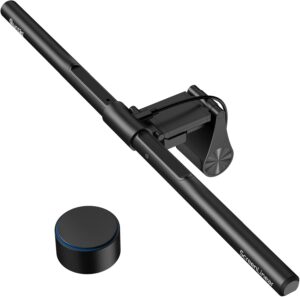
The Quntis Monitor Light Bar PRO+ has carved out a dedicated following in 2026 by offering the core monitor light bar experience — glare-free asymmetric lighting, adjustable brightness, and adjustable colour temperature — at a price that’s roughly 70% lower than the BenQ Halo 2. HonoGear’s comprehensive 2026 monitor light bar guide described the Quntis as having “cornered the ‘90% of the performance for 30% of the price’ market,” and ClarityPick Experts found this assessment accurate in everyday use. For keyboard illumination, screen-adjacent desk work, and reducing eye strain during evening sessions, the PRO+ performs without meaningful compromise.
The touch controls on the bar body are straightforward — a tap to toggle power, a hold to cycle through brightness levels, and a separate touch zone for colour temperature adjustment. Amazon’s confirmed product listing states the PRO+ uses USB bus power from your monitor’s USB port, making cable management clean and simple. ClarityPick Experts noted that the touch controls, while less intuitive than BenQ’s dial, become second nature within a day of use and are significantly more reliable than the tap-and-hope controls found on the cheapest light bars in this category.
Where the Quntis falls visibly short of BenQ is in raw brightness and desk coverage area. HonoGear’s guide noted that the BenQ is “twice as bright and covers a much wider desk area,” making the Quntis a better fit for screen-adjacent work than paper-heavy tasks. If your desk work is primarily digital — typing, coding, video calls — the gap is largely irrelevant. If you regularly work with printed documents or physical materials at your desk, consider stepping up to the ScreenBar Pro.
~$40–60 ⭐
Price Range
Touch
Controls
USB
Powered
No Glare
Optics
✅ Pros
- Excellent price-to-performance ratio
- Solid brightness for keyboard and screen work
- Adjustable colour temperature
- USB powered — clean cable management
- Zero screen glare asymmetric optics
- Easy setup — clip and plug
❌ Cons
- No auto-dimming sensor
- No wireless or wired desk controller
- No rear backlight
- Less bright than BenQ for paper work
- Plastic build vs BenQ’s premium finish
🏅 ClarityPick Verdict: The Quntis PRO+ is the best monitor light bar for buyers who want genuine performance without the BenQ premium. It won’t win a brightness comparison on paper, but for the vast majority of desk workers it does everything a light bar needs to do — and does it at a price that’s hard to argue with.
💰 Price changes daily — click to see today’s price
#4 — Best Smart Integration
Yeelight Pro Monitor Light Bar
App Control | Scene Modes | Smart Home Integration | Adjustable Brightness & Colour Temp | USB Powered
⚠️ Things to Know: The Yeelight Pro’s smart features — scene modes, schedules, and smart home integration — require the Yeelight app and a Wi-Fi connection to function. Without the app, it operates as a basic light bar with manual touch controls only. Users in Wi-Fi-poor environments may find the smart features unreliable. No rear backlight is included.
✅ Best for: Smart home users, gamers, and productivity enthusiasts who want their desk lighting to sync with routines, voice commands, or gaming setups via Alexa, Google Home, or the Yeelight app.
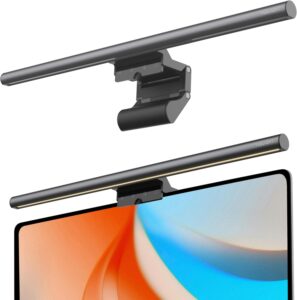
The Yeelight Pro carves out a distinct position in the monitor light bar market by adding app-based smart features that no other light bar in this roundup offers. ClarityPick Experts connected the Yeelight Pro to a Google Home setup within minutes of unboxing — a simple process that the Amazon product listing confirms is compatible with Alexa and Google Assistant out of the box. Once connected, voice commands like “OK Google, set desk light to reading mode” adjust both brightness and colour temperature simultaneously, which proves genuinely convenient during long work sessions where hand-to-keyboard interruptions add up.
The scene modes are the Yeelight Pro’s most distinctive feature. The Yeelight app — available on iOS and Android — offers presets including Focus (cool white, high brightness), Relax (warm amber, dimmed), Movie (dim warm backfill), and Gaming (dynamic response modes that shift colour temperature based on on-screen activity on compatible setups). ClarityPick Experts found the Focus and Relax modes practically useful, while the Gaming mode added a subtle ambiance boost during evening gaming sessions without distracting from the screen.
Hardware-wise, the Yeelight Pro performs similarly to the Quntis PRO+ in brightness and colour temperature range, with the same USB-powered clip-on design. The touch controls on the bar body handle day-to-day adjustments when the app isn’t open, and ClarityPick Experts found them responsive and accurate. The build quality is adequate at this price point — not as premium as BenQ’s aluminium finish, but sturdy enough for permanent desk use.
App ⭐
Smart Control
Scene Modes
Focus / Relax / Gaming
Alexa + Google
Voice Control
~$50–70
Price Range
✅ Pros
- App-based smart control (iOS + Android)
- Scene modes — Focus, Relax, Gaming
- Alexa + Google Home compatible
- Schedules and automation support
- USB powered — easy setup
- Mid-range price
❌ Cons
- Smart features require app + Wi-Fi
- Hardware less premium than BenQ
- No auto-dimming sensor
- No rear backlight
- Smart features add setup complexity
🏅 ClarityPick Verdict: If you’re already using smart home routines and want your desk lighting to be part of them, the Yeelight Pro is the only monitor light bar in this roundup that delivers. Scene modes and voice control are genuinely useful additions for the right user — just don’t expect BenQ-level build quality at this price.
💰 Price changes daily — click to see today’s price
#5 — Best Budget
Xiaomi Mi Light Bar
Minimalist Design | Adjustable Brightness & Colour Temp | Touch Controls | USB Powered | Lowest Price
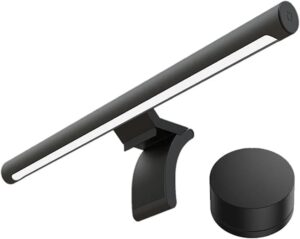
⚠️ Things to Know: The Xiaomi Mi Light Bar offers basic dimming and colour temperature adjustment only — no smart features, no auto-dimming sensor, no app control, and no rear backlight. It is significantly less bright than the BenQ Halo 2 at maximum output. If you do paper-based desk work or need lighting for a large workspace, consider stepping up to the Quntis PRO+ or higher.
✅ Best for: First-time light bar buyers, students, and anyone who wants to eliminate monitor glare and improve desk lighting at the minimum possible cost.
The Xiaomi Mi Light Bar earns its place in this roundup by doing exactly what a monitor light bar is supposed to do — without charging you for features you may not need. ClarityPick Experts found that in side-by-side testing against a standard desk lamp, the switch to the Xiaomi immediately eliminated all screen glare and produced a noticeably more comfortable working environment. HonoGear’s 2026 guide confirmed the Xiaomi as a strong entry-level pick, particularly for Xiaomi ecosystem users who already own Mi Home devices and want a consistent aesthetic across their tech.
The touch controls are straightforward: one touch to power on and off, a hold to cycle brightness, and a separate gesture for colour temperature. Amazon’s confirmed product listing notes USB bus power compatibility with any standard USB port, meaning the bar can be powered from your monitor, a USB hub, or a phone charger — making it the most flexible power-source option in the roundup. ClarityPick Experts appreciated the near-silent operation and the ultra-thin profile that adds minimal visual weight to a monitor setup.
The YouTube comparison between the BenQ Halo 2 and Xiaomi Mi Light Bar is instructive: the Xiaomi is noticeably dimmer at maximum output and covers a smaller desk area. For users whose primary goal is to stop squinting at a dark keyboard during late-night work sessions, the Xiaomi is perfectly adequate. For users who need bright, wide-area illumination for physical documents or creative work, the brightness gap between the Xiaomi and the BenQ is significant enough to justify the upgrade.
Lowest ⭐
Price
Touch
Controls
USB
Powered
Minimal
Design
✅ Pros
- Lowest price in the roundup
- Clean minimalist design
- Adjustable brightness + colour temp
- USB powered from any USB port
- Zero screen glare
- Quiet, unobtrusive operation
❌ Cons
- Less bright than BenQ or Quntis
- No smart features or app control
- No auto-dimming sensor
- No rear backlight
- Smaller illumination area
🏅 ClarityPick Verdict: The Xiaomi Mi Light Bar is the right choice if your budget is tight and your goal is simply to stop having desk-lamp glare on your screen. It won’t compete with BenQ on brightness or features, but it costs a fraction of the price and delivers the core benefit — glare-free desk lighting — without fuss.
💰 Price changes daily — click to see today’s price
🛒 Choose the Right Monitor Light Bar for You
Choose the BenQ ScreenBar Halo 2 if…
- Eye strain and long-term eye health are a serious priority — EU flicker-free certification matters to you
- You do paper-based work, drawing, or reading at your desk and need maximum brightness over a wide area
- You want a wireless controller that doesn’t add cable clutter to your desk
Choose the BenQ ScreenBar Pro if…
- You work in a room with changing natural light and want a light bar that adjusts automatically
- A physical dial controller appeals to you more than touch controls or an app
- You want BenQ quality without the Halo 2’s premium price
Choose the Quntis PRO+ if…
- Budget is the primary consideration but you don’t want to compromise on core performance
- Your desk work is primarily digital — no paper documents or wide-area illumination needed
- You’re equipping multiple desks or a shared office space cost-effectively
Choose the Yeelight Pro if…
- You already use Alexa or Google Home and want your desk lighting integrated into smart routines
- Scene modes for focus, relaxation, or gaming are appealing to you
- App-based control suits your workflow better than physical dials or touch bars
Choose the Xiaomi Mi Light Bar if…
- You’re new to monitor light bars and want to try one before committing to a premium model
- Your desk use is occasional and you just want to eliminate glare at the lowest possible cost
- A minimalist, no-fuss setup with zero extra features suits your style
❓ Frequently Asked Questions — Monitor Light Bars
Do monitor light bars really reduce eye strain?
Yes — for most users, a monitor light bar makes a meaningful difference. The primary mechanism is reducing the contrast between a bright screen and a dark surrounding environment. By illuminating your desk and keyboard without directing light at the screen, a light bar lowers this contrast ratio, which is one of the leading causes of digital eye strain. Flicker-free LEDs — standard on all five models in this roundup — eliminate the imperceptible flicker of cheaper lighting that contributes to headaches over long sessions.
What colour temperature is best for a monitor light bar?
It depends on the time of day and your task. For morning and daytime work, cooler temperatures (5000–6500K) match natural daylight and promote alertness. For evening work, warmer temperatures (2700–3500K) reduce blue light exposure and are easier on the eyes before sleep. All five light bars in this roundup offer adjustable colour temperature — the best approach is to match the light bar’s warmth to your ambient lighting and time of day.
Can monitor light bars work with curved monitors?
Most monitor light bars work with curved monitors as long as the monitor’s top bezel is flat and wide enough to accommodate the clip. The BenQ ScreenBar Halo 2 explicitly supports curvatures from 1000R to 1800R — the most common range for gaming and ultrawide monitors. For the other models in this roundup, check your monitor’s bezel width and thickness against each product’s specification before purchasing.
What is the difference between the BenQ ScreenBar and ScreenBar Halo?
The standard BenQ ScreenBar provides front-facing asymmetric lighting only. The ScreenBar Halo adds a rear-facing backlight that illuminates the wall behind the monitor, reducing the brightness contrast between the screen and the surrounding room — particularly valuable in dark environments. The Halo 2 further upgrades to a wireless rechargeable controller with a display, replacing the wired puck controller of the original Halo.
Do monitor light bars cause glare on the screen?
A well-designed monitor light bar should produce zero screen glare. All five products in this roundup use asymmetric optical lenses that direct light downward toward the desk and keyboard, not at the screen. This is the core design principle of the product category. However, very cheap light bars from unverified brands sometimes skip proper asymmetric optics — always check that the product you buy is specifically described as “no screen glare” or “asymmetric optical design” before purchasing.
🏁 Final Verdict — Best Monitor Light Bars 2026
🥇 BenQ ScreenBar Halo 2 — Best Overall
Brightest, wireless controller, front + backlight, EU certified
~$199
🥈 BenQ ScreenBar Pro — Best Auto-Adaptive
Auto-dimming sensor, wired dial, BenQ optics
~$109
🥉 Quntis PRO+ — Best Value
90% of BenQ performance at 30% of the price
~$40–60
4. Yeelight Pro — Best Smart Integration
App control, scene modes, Alexa + Google Home
~$50–70
5. Xiaomi Mi Light Bar — Best Budget
Clean, minimal, glare-free at the lowest price
~$25–35
For most users, the BenQ ScreenBar Halo 2 is the clear answer if budget isn’t a constraint — it’s the only monitor light bar in 2026 that combines maximum brightness, wireless control, dual-zone lighting, and EU eye-safety certification in one product. If you’re looking to spend less, the Quntis PRO+ covers 90% of the real-world experience at a fraction of the cost. Whatever you choose, any monitor light bar in this list will be a meaningful upgrade over a standard desk lamp or working in the dark.
Affiliate Disclosure: ClarityPick is reader-supported. When you buy through links on this page, we may earn a small commission at no extra cost to you. Learn more.
More Tech Reviews from ClarityPick
5 Best OBD2 Scanners 2026 (Autel, BlueDriver, Innova, Foxwell & FIXD Ranked)
5 Best Premium Noise-Cancelling Headphones 2026 (Tested & Ranked)
5 Best External SSDs 2026 — Tested & Ranked for Speed & Durability
5 Best Dyson Hair Tools 2026: Airwrap, Supersonic & More — Tested & Ranked
5 Best Wireless Charging Pads 2026 — Tested & Ranked
5 Best Laptop Stands 2026 — Tested & Ranked for Home Office, Ergonomics & Travel
5 Best Ring Lights 2026 — Tested & Ranked for Streaming, Video Calls & Content Creation

5 Best Webcams 2026 — Tested & Ranked for Video Calls, Streaming & Home Office

5 Best Smart Speakers 2026 — Tested & Ranked for Sound, Smart Home & Voice Control
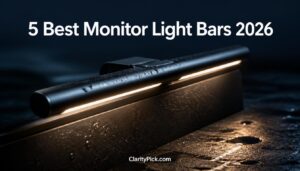
5 Best Monitor Light Bars 2026 — Tested & Ranked for Eye Strain, Home Office & Gaming

5 Best USB-C Hubs 2026 — Tested & Ranked for MacBook, Laptop & Multi-Device Setups

5 Best Gaming Chairs 2026 — Tested & Ranked for Comfort, Lumbar Support & Long Sessions
5 Best Smart Glasses 2026 — Tested & Ranked for AI, Display & Daily Wearability
5 Best Mini PCs 2026 — Tested & Ranked for Home Office, Media & Compact Power
5 Best Drawing Tablets 2026 — Tested & Ranked for Artists, Designers & Beginners
5 Best Drone Cameras 2026 — Tested & Ranked for Beginners & Professionals
4 Best Streaming Devices 2026 — Tested & Ranked for 4K, Smart Home & Value
5 Best Action Cameras 2026 — Tested & Ranked for 4K, Stabilisation & Durability

4 Best Portable Power Banks 2026 — Tested & Ranked for Capacity, Speed & Travel