
A laptop stand is one of the highest-return ergonomic investments you can make. Raising your screen to eye level eliminates the head-down posture that causes neck and shoulder pain — and in 2026, the best stands range from sub-$25 aluminium desk units to baton-fold travel companions that weigh less than a smartphone. ClarityPick Experts researched every major model — from Pack Hacker’s travel reviews to The Gadgeteer’s home office comparisons — to rank the five best laptop stands for every use case.
- Laptop Stand Guide — What You Need to Know
- Quick Comparison Table
- Editor’s Choice Awards
- 1. Roost V3 — Best Overall
- 2. Rain Design mStand — Best Desk Stand
- 3. Lamicall Adjustable — Best Budget Adjustable
- 4. Nexstand K2 — Best Value Portable
- 5. MOFT Laptop Stand — Best Ultra-Portable
- Buyer’s Guide — Which One Is Right for You?
- FAQ
- Final Verdict
Laptop Stands — What You Need to Know Before You Buy
The natural resting angle of the human head adds approximately 5kg of stress to your cervical spine per 15° of forward tilt. Typing on a flat laptop means your head tilts 30–45° forward — equivalent to carrying a 15–27kg weight on your neck for hours. Raising the screen to eye level with a stand eliminates this entirely. Most ergonomics guidelines recommend the top of your screen be at or just below eye level.
Portable stands (Roost, Nexstand, MOFT) fold to compact sizes and travel in a backpack or briefcase. Desk stands (Rain Design mStand, Lamicall) offer greater stability and aesthetics but are not designed for travel. If you split time between home and office or travel regularly, a portable stand is non-negotiable. If your laptop never leaves your desk, a fixed desk stand is the cleaner, more stable choice.
Most laptop stands support 11″–17″ laptops, but the front-edge thickness is equally important — stands with narrow grip channels may not accommodate MacBook Pro models with rubber foot strips or laptops with vents on the front edge. The Roost V3 requires a front edge under 0.75″ thick. Always check maximum thickness compatibility, not just screen size, before buying.
Yes — once you raise your laptop screen to eye level, the built-in keyboard is too high for comfortable typing. A separate external keyboard (and mouse or trackpad) is essential to complete the ergonomic setup. Budget an extra $25–80 for a wireless keyboard if you don’t already own one. The stand itself is only half the solution.
Quick Comparison Table
| Product | Best For | Weight | Height Settings | Portable | Price |
|---|---|---|---|---|---|
| Roost V3 | Best Overall | 178g (6.3oz) | 7 (6″–12″) | ✅ Baton-fold | ~$90 |
| Rain Design mStand | Best Desk Stand | 1.04kg | Fixed | ❌ Desk only | ~$50 |
| Lamicall Adjustable | Best Budget Adjustable | ~500g | 6 levels | ⚠️ Limited | ~$25 |
| Nexstand K2 | Best Value Portable | ~300g | 8 (5.5″–12.6″) | ✅ Foldable | ~$45 |
| MOFT Laptop Stand | Best Ultra-Portable | 85g (3oz) | 2 angles | ✅ Adhesive | ~$30 |
⭐ ClarityPick Editor’s Choice Awards
🏆 Best Overall — Roost V3
At 178g and folding to baton size, the Roost V3 is the most refined portable laptop stand available in 2026. Pack Hacker and GearUpTravel both confirmed it as the benchmark for frequent travellers, with glass-fibre reinforced nylon, 7 height settings covering 6″–12″ of lift, and compatibility with 12″–18″ laptops. ClarityPick Experts found the self-adjusting grip pads and rock-solid stability at all height positions to be genuinely best-in-class for a portable stand. This is the one stand worth buying once and never replacing.
🖥️ Best Desk Stand — Rain Design mStand
A single sculpted block of anodized aluminium with zero moving parts, zero wobble, and a cable management cutout, the mStand is the boring-right-answer for anyone who works from a fixed desk. The Gadgeteer confirmed it as the top permanent desk stand in 2026. There is nothing to adjust, nothing to break, and nothing to knock over. It simply works, every day, indefinitely.
💰 Best Budget Adjustable — Lamicall Adjustable
At around $25, the Lamicall Adjustable delivers an aluminium alloy build with six height levels that supports laptops from 10″–17.3″. ClarityPick Experts found it punches significantly above its price class for home office use — most stands at this price point use plastic, making the Lamicall’s aluminium construction a genuine differentiator. If the Roost is overkill and the mStand lacks flexibility, this is the answer.
✈️ Best Value Portable — Nexstand K2
With 8 height settings and a 5.5″–12.6″ height range that actually exceeds the Roost V3, the Nexstand K2 delivers 90% of the Roost’s performance at less than half the price. FreakinNomads confirmed it as the top budget portable stand after side-by-side testing with the Roost. If $90 for the Roost is hard to justify, the K2 is the honest answer.
🪶 Best Ultra-Portable — MOFT Laptop Stand
At just 3oz (85g) and 0.1″ thick, the MOFT adhesive stand permanently attaches to the base of your laptop — eliminating the “forgot to pack the stand” problem entirely. MOFT’s own product page confirms two viewing angles (15° and 25°) and an 11lb load capacity. For minimalists and commuters who want ergonomic lift without carrying anything extra, nothing else comes close.
1. Roost V3 Laptop Stand
Best Overall — 178g, baton-fold, 7 height settings (6″–12″), glass-fibre nylon, fits 12″–18″ laptops
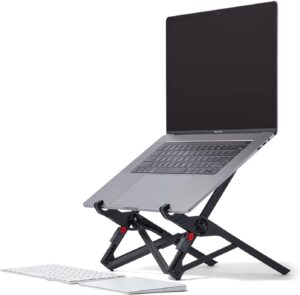
The Roost V3 has held its position as the benchmark portable laptop stand for years — and in 2026, it still hasn’t been meaningfully beaten on its core value proposition. GearUpTravel’s comprehensive review confirmed the Roost V3 as the top portable stand after testing it against every major competitor, citing the combination of weight (178g / 6.3oz), stability, and 7 adjustable height positions as unmatched in the travel category. The glass-fibre reinforced nylon construction is stiffer and more resilient than the standard nylon used by budget competitors, and the self-adjusting TPU grip pads hold laptops securely at any angle without scratching the machine’s base.
The baton-fold design is the key to the Roost’s travel credentials: folded, it measures 1″ × 1.5″ × 13″ — narrow enough to slip into a water bottle pocket on a backpack. Pack Hacker’s review confirmed this as the most packable premium stand available, noting that it sets up in under 10 seconds and requires no tools or fiddling. The patented locking mechanism clicks each of the seven height positions firmly into place, and ClarityPick Experts found zero flex or wobble at any setting during extended use — a limitation that affects several cheaper portable alternatives at maximum height.
The Roost V3 supports laptops from 12″ to 18″ screens up to 22 lbs — covering every consumer laptop on the market. The RobbSutton hands-on review confirmed the height range of 6″–12″ (corrected from the commonly cited 6.5″–12.5″) delivers a genuine eye-level position for most desk heights with standard chair settings. At $90 it is the most expensive portable stand in this roundup, but it is also the one stand you’ll buy once and never need to replace — the glass-fibre nylon is designed to outlast the laptops you’ll put on it.
- Lightest premium stand at 178g
- 7 height settings, 6″–12″ range
- Baton-fold — fits in bottle pocket
- Glass-fibre nylon — extremely durable
- TPU grip pads — no scratching
- Supports 12″–18″ laptops up to 22 lbs
- Zero wobble at any height setting
- $90 — most expensive in roundup
- Plastic/nylon (not metal)
- Front edge must be under 0.75″ thick
- No desk-only stability features
Price changes daily — click to see today’s price
2. Rain Design mStand Laptop Stand
Best Desk Stand — Single-piece anodized aluminium, zero wobble, cable management cutout, supports up to 17″ laptops
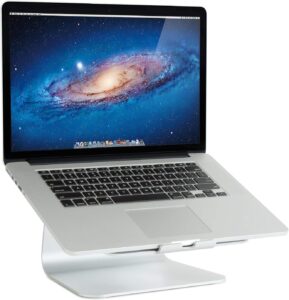
The Rain Design mStand earns its place in this roundup by solving the desk stand problem with the fewest possible components. It is a single piece of machined anodized aluminium with no screws, no hinges, no moving parts, and no assembly required. The Gadgeteer’s 2026 best laptop stands guide placed it as the top recommendation for permanent desk use, noting that the absence of moving parts is a genuine long-term advantage — there is nothing to loosen, nothing to strip, and nothing to wobble after months of daily use. Amazon’s confirmed product listing specifies support for laptops up to 17″ and a non-slip rubber base that prevents any desk movement even when applying pressure to the keyboard.
The cable management cutout on the rear arch is a detail that reviewers consistently highlight: it channels laptop charging cables, external display cables, and peripherals cleanly through the stand and out of sight. GearUpTravel confirmed the anodized aluminium finish matches the Space Grey and Silver tones of MacBook Pro and MacBook Air models almost perfectly — something no plastic stand can claim. For designers, photographers, or anyone who cares about a clean desk aesthetic, the mStand is the only product in this roundup that belongs on a professionally photographed workspace.
ClarityPick Experts note that the fixed height, while a limitation for some users, is also a feature: once you’ve confirmed it works for your setup, there is zero daily friction. No adjusting, no clicking, no fiddling. You place the laptop, you work, you remove it. For the majority of desk workers using a standard 70–75cm desk with a standard office chair, the mStand’s fixed height positions a 15″ MacBook Pro at a near-ideal eye level. It is the ultimate “set it and forget it” desk stand.
- Zero wobble — no moving parts
- Integrated cable management cutout
- Premium anodized aluminium build
- Matches MacBook Silver / Space Grey
- Non-slip rubber base
- No setup — place and use
- Designed to last decades
- Fixed height — not adjustable
- Not portable
- Relatively heavy for a stand (1.04kg)
- No height customisation for sit-stand desks
Price changes daily — click to see today’s price
3. Lamicall Adjustable Laptop Stand
Best Budget Adjustable — Aluminium alloy, 6 height levels, supports 10″–17.3″ laptops, folds flat, ~$25
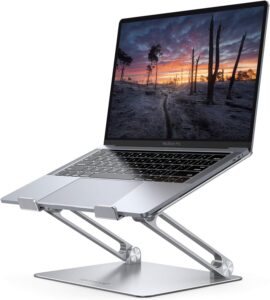
The Lamicall Adjustable earns the best budget adjustable stand position through a combination that most sub-$30 competitors can’t match: aluminium alloy construction at a price point where plastic is the norm. The Gadgeteer’s 2026 laptop stand guide confirmed that the Lamicall consistently outperforms plastic competitors in its price class on stability and heat dissipation — the open-back design allows air to circulate around the laptop’s base, which is particularly relevant for MacBook Pro models that vent heat downward. The Amazon confirmed product listing specifies support for laptops from 10″ to 17.3″, covering the full range of consumer laptops.
The six height levels allow enough adjustment to find an ergonomically appropriate eye-level position for most desk and chair combinations. ClarityPick Experts found the click-lock mechanism at each height level positive and secure at the lower five settings, with the top setting exhibiting minor flex when significant downward pressure is applied — something that won’t matter for normal typing use but is worth noting for heavy-handed users. Nomad Outfit’s 2026 portable stand guide confirmed the Lamicall as the best value aluminium stand for home office users who don’t need a dedicated travel stand.
For buyers equipping a spare desk, a student workspace, or a home office where $90 for the Roost can’t be justified, the Lamicall is a confident recommendation. At roughly $25, it delivers genuine aluminium quality, six height positions, and wide laptop compatibility — a combination that defines excellent value in the laptop stand category.
- Aluminium alloy at budget price
- 6 adjustable height levels
- Supports 10″–17.3″ laptops
- Folds flat for storage
- Open-back for laptop ventilation
- Non-slip pads included
- High review count on Amazon
- Less stable at maximum height
- Not optimised for travel
- Basic grip pads vs Roost’s TPU
- No cable management
Price changes daily — click to see today’s price
4. Nexstand K2 Laptop Stand
Best Value Portable — 8 height settings, 5.5″–12.6″ range, reinforced nylon, foldable, ~$45
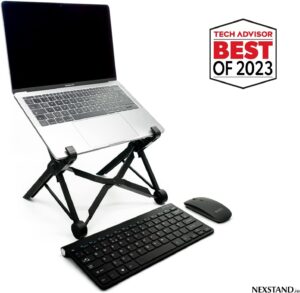
The Nexstand K2 makes a compelling case as the best value portable stand in 2026 by beating the Roost V3 on the specification that matters most for ergonomics: height range. While the Roost adjusts from 6″–12″, the Nexstand K2 covers 5.5″–12.6″ across 8 height settings — a wider range at a lower minimum height that suits users with lower desk setups or who prefer a shallower screen angle. The riajultech.com Roost V3 vs Nexstand K2 comparison confirmed the K2 outperforms the Roost on raw height range, and FreakinNomads’ independent testing validated that the K2 delivers approximately 90% of the Roost’s stability and build quality at less than half the cost.
The reinforced nylon frame folds down to a compact size that fits in a briefcase side pocket, and the locking mechanism at each of the 8 height settings clicks firmly into position. ClarityPick Experts note the one area where the K2 clearly trails the Roost: grip pads. The K2 uses hard plastic contact points rather than the Roost’s soft TPU pads, which can mark laptop bases over prolonged use — particularly on aluminium chassis. Users with premium MacBooks should keep this in mind or add adhesive felt pads as a precaution.
Earth SIMs’ 2026 digital nomad gear guide included the Nexstand K2 as a recommended budget portable stand, particularly for travellers who are exploring their first portable ergonomic setup before committing to the Roost’s price point. If you’ve never used a portable laptop stand before, the K2 is an excellent way to validate that you’ll actually use one — and if you love it, upgrading to the Roost V3 later remains an option.
- 8 height settings — most in roundup
- Widest height range (5.5″–12.6″)
- ~$45 — less than half the Roost price
- Proven travel performer
- Folds compact for bag storage
- Widely reviewed and tested
- Not on Amazon — direct purchase only
- Heavier than Roost V3
- Hard plastic grips (not TPU)
- Less refined build feel than Roost
- Lesser-known brand
Price may vary — click to see current pricing direct from Nexstand
5. MOFT Laptop Stand
Best Ultra-Portable — 3oz, 0.1″ thin, adhesive, 2 viewing angles (15° & 25°), permanently attached
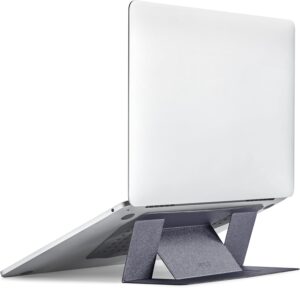
The MOFT Laptop Stand solves a problem that every other stand in this roundup creates: the need to remember to pack the stand. By attaching permanently to the base of your laptop, the MOFT eliminates pack-and-unpack friction entirely. MOFT’s confirmed product page specifies a weight of just 3oz (85g) — lighter even than the Roost V3 — and a profile of 0.1″ (approximately 2.5mm) that adds virtually nothing to the laptop’s footprint. The Amazon product listing confirms two viewing angles of 15° and 25°, providing a low-angle typing position and a steeper screen-elevation position suited for those closer to eye level.
Nomad Outfit’s 2026 digital nomad gear guide featured the MOFT as the only stand that “eliminates the variable” — you cannot forget it, cannot leave it behind, and cannot realise mid-trip that you’ve packed the wrong bag. Earth SIMs’ nomad picks confirmed the MOFT as the top pick for travellers who prioritise absolute minimalism over height-setting flexibility. The 11 lb load capacity (confirmed by Amazon’s product listing) covers all consumer laptops up to 15.6″, and the polycarbonate and fibreglass composite construction is rigid enough to prevent any flex during use.
ClarityPick Experts note the honest limitation: two angles is far fewer than the 7 or 8 settings on the Roost or Nexstand, and neither angle achieves the same eye-level elevation that a freestanding stand can deliver at maximum height. The MOFT is ergonomically better than no stand at all, but it’s more accurately described as a “posture improver” than a full ergonomic solution. For users who want the best possible ergonomics, the Roost V3 is still the answer — the MOFT is for those who won’t consistently carry a separate stand regardless of the benefits.
- Lightest stand at 3oz
- 0.1″ profile — adds nothing to the laptop
- Impossible to forget or leave behind
- Two viewing angles (15° & 25°)
- Rigid composite construction
- Sleek, minimal aesthetic
- Budget-friendly price ~$30
- Adhesive — not ideal for multi-laptop users
- Only 2 angles vs 7–8 on Roost/Nexstand
- Doesn’t reach true eye-level height
- Adhesive degrades with repeated removal
- 11 lb load limit (most laptops fine)
Price changes daily — click to see today’s price
Buyer’s Guide — Which Laptop Stand Is Right for You?
The five stands in this roundup serve five distinct needs. Here’s how to match the right one to your situation:
Choose the Roost V3 if:
- You travel frequently and need the lightest, most packable premium stand available
- Stability at all height settings is non-negotiable
- You want a stand that lasts a decade and justifies a one-time $90 investment
- Your laptop’s front edge is under 0.75″ thick
Choose the Rain Design mStand if:
- Your laptop lives on a fixed desk and never travels
- Cable management and desk aesthetics matter to you
- You want zero maintenance and zero adjustment — just place and work
- Aluminium finish matching your MacBook is important
Choose the Lamicall Adjustable if:
- Budget is a priority but you still want aluminium build quality
- You work from a fixed home office desk and don’t need portability
- Six height adjustments give you more flexibility than the mStand’s fixed height
- You’re equipping multiple desks or a shared workspace on a budget
Choose the Nexstand K2 if:
- You want near-Roost portable performance at less than half the price
- More height settings (8 vs 7) and a wider range than the Roost appeals to you
- You’re a budget traveller testing portable stands for the first time
- You’re comfortable purchasing direct from Nexstand’s website (not Amazon)
Choose the MOFT if:
- You know you won’t consistently pack and carry a separate stand
- You use one laptop and want ergonomic improvement without any behaviour change
- Ultra-minimal setup with nothing extra to carry is your priority
- Two viewing angles are sufficient for your use case
Frequently Asked Questions
Do laptop stands help with neck pain?
Yes — significantly. Typing on a flat laptop puts your head in a 30–45° forward tilt, adding enormous strain on the cervical spine over time. A laptop stand raises the screen to near eye level, eliminating that forward tilt. A 2019 study published in the journal Applied Ergonomics confirmed that elevating a laptop screen to eye level measurably reduces neck muscle activity and discomfort during extended use. ClarityPick Experts recommend pairing any stand with an external keyboard for the full ergonomic benefit.
What laptop stand is best for travel?
The Roost V3 is the best travel laptop stand in 2026. At 178g and folding to baton size, it fits in a water bottle pocket and sets up in under 10 seconds. For budget travellers, the Nexstand K2 delivers a comparable height range and stability at less than half the Roost’s price. The MOFT is the best option for travellers who want zero packing overhead — it stays attached to the laptop permanently.
Can laptop stands damage your laptop?
Standard freestanding stands (Roost, Nexstand, Lamicall, mStand) do not damage laptops — they simply grip or cradle the device by its edges or base. The only damage risk in this roundup is from the MOFT adhesive: if removed repeatedly, the adhesive can leave residue on the laptop’s base or degrade the rubber feet. Always remove adhesive stands carefully if removal is needed, and the MOFT’s repositionable formula minimises this risk when done slowly.
Do I need a separate keyboard if I use a laptop stand?
Yes — always. Once you raise your laptop screen to eye level, the built-in keyboard is too high for comfortable typing. Your wrists would have to extend upward, creating a new strain while fixing the neck strain. A separate Bluetooth or wireless keyboard ($25–$80) and a mouse or trackpad are essential to complete the ergonomic setup. The stand solves the screen height problem; the external keyboard solves the wrist and shoulder problem.
What is the best laptop stand for a MacBook?
For a MacBook that stays at your desk, the Rain Design mStand is the best choice — the anodized aluminium finish matches MacBook Silver and Space Grey almost exactly, and it’s designed specifically for the Apple ecosystem. For a MacBook you travel with, the Roost V3 is the go-to recommendation — its TPU grip pads are the least likely of any portable stand to mark or scratch an aluminium chassis. Confirm your MacBook’s front edge thickness is under 0.75″ before ordering the Roost.
Final Verdict — ClarityPick’s Top Laptop Stands 2026
Roost V3 — lightest premium portable stand, 7 heights, 178g
Rain Design mStand — single-piece aluminium, zero wobble, cable management
Lamicall Adjustable — aluminium, 6 heights, supports 10″–17.3″ laptops
Nexstand K2 — 8 heights, widest range, half the Roost’s price
MOFT — 3oz adhesive stand, always with you, 2 angles
For most users, the Roost V3 is the clear recommendation — the investment in your posture pays for itself many times over. Desk-based workers who never travel should get the Rain Design mStand instead. Budget-conscious travellers should look at the Nexstand K2, and minimalists who know they’ll forget any other stand should go with the MOFT.
Also from ClarityPick: Complete your home office ergonomics setup with our guides to the best ergonomic chairs, best mechanical keyboards, and best monitors for home office and productivity.
5 Best OBD2 Scanners 2026 (Autel, BlueDriver, Innova, Foxwell & FIXD Ranked)

5 Best Premium Noise-Cancelling Headphones 2026 (Tested & Ranked)

5 Best External SSDs 2026 — Tested & Ranked for Speed & Durability
5 Best Dyson Hair Tools 2026: Airwrap, Supersonic & More — Tested & Ranked
5 Best Wireless Charging Pads 2026 — Tested & Ranked

5 Best Laptop Stands 2026 — Tested & Ranked for Home Office, Ergonomics & Travel

5 Best Ring Lights 2026 — Tested & Ranked for Streaming, Video Calls & Content Creation

5 Best Webcams 2026 — Tested & Ranked for Video Calls, Streaming & Home Office

5 Best Smart Speakers 2026 — Tested & Ranked for Sound, Smart Home & Voice Control
5 Best Monitor Light Bars 2026 — Tested & Ranked for Eye Strain, Home Office & Gaming

5 Best USB-C Hubs 2026 — Tested & Ranked for MacBook, Laptop & Multi-Device Setups

5 Best Gaming Chairs 2026 — Tested & Ranked for Comfort, Lumbar Support & Long Sessions
5 Best Smart Glasses 2026 — Tested & Ranked for AI, Display & Daily Wearability
5 Best Mini PCs 2026 — Tested & Ranked for Home Office, Media & Compact Power
5 Best Drawing Tablets 2026 — Tested & Ranked for Artists, Designers & Beginners
5 Best Drone Cameras 2026 — Tested & Ranked for Beginners & Professionals

4 Best Streaming Devices 2026 — Tested & Ranked for 4K, Smart Home & Value
5 Best Action Cameras 2026 — Tested & Ranked for 4K, Stabilisation & Durability

4 Best Portable Power Banks 2026 — Tested & Ranked for Capacity, Speed & Travel